 ← PostgreSQL Blog
Managing Oracle Database Links in a Multi-Container Environment
Managing Oracle Database Links in a Multi-Container Environment
Setting Up Container Databases (CDBs) and Pluggable Databases (PDBs)
To start with, we’ll create two container databases (CDBs) and then establish at least one pluggable database (PDB) for each CDB. A CDB serves as the main container that houses one or more PDBs, which are essentially separate databases within the CDB.
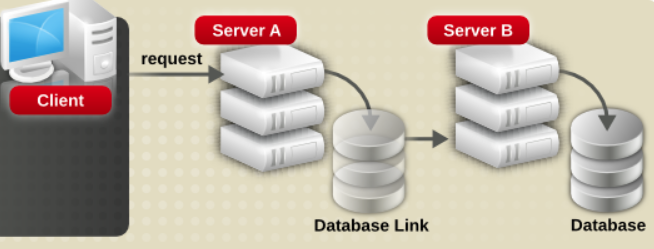
Creating a User with System Privileges and Roles
After setting up the databases, we’ll create a new user and grant them specific system privileges and roles. These include:
- Resource
- Connect
- Create Session
- Unlimited Tablespace
These permissions ensure that the user has the necessary access rights to perform various database operations.
Creating Tables in the First Container Database (CDB1)
Next, we’ll create tables in the first container database (CDB1) using the newly created user, named “ahmet”. This step involves defining the table structure and inserting data as needed.
Establishing Database Links to Another Database (yol1)
Now, we’ll set up a shared public database link to connect to another database named “yol1”. This allows us to access and query tables across different databases seamlessly.
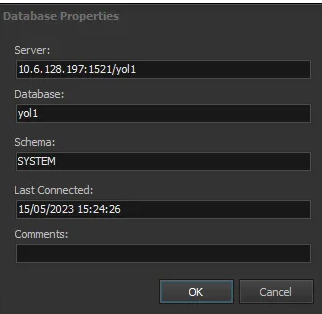
Here’s the SQL command to create the database link:
CREATE SHARED PUBLIC DATABASE LINK BRIDGED1
  AUTHENTICATED BY new_user_name
  IDENTIFIED BY password
  USING 'database_name_including_table';
For example:
CREATE SHARED PUBLIC DATABASE LINK bridged1
  AUTHENTICATED BY aslı
  IDENTIFIED BY "test123"
  USING 'CBS1';
Granting and Using Permissions
Once the database link is established, we can grant specific permissions on tables and execute SQL queries across databases. For instance:
GRANT SELECT ON hastane TO ASLI;Querying Across Databases
Finally, we can execute various SQL queries to retrieve and manipulate data across the linked databases. Examples include:
- Simple select query:
SELECT * FROM user.geo@bridged1;- Conditional select query:
SELECT * FROM user.geo@bridged1 WHERE department='geo';- Joining tables:
SELECT * FROM user.geo@bridged1 INNER JOIN user.geo1@bridged1 ON user.geo.ID = user.geo1.ID;In summary, managing Oracle database links in a multi-container environment involves setting up CDBs and PDBs, creating users with appropriate privileges, establishing database links between databases, and executing cross-database queries to access and manipulate data seamlessly.