 ← PostgreSQL Blog
RMAN Backup Basic Commands
Basic RMAN Backup Commands in Oracle
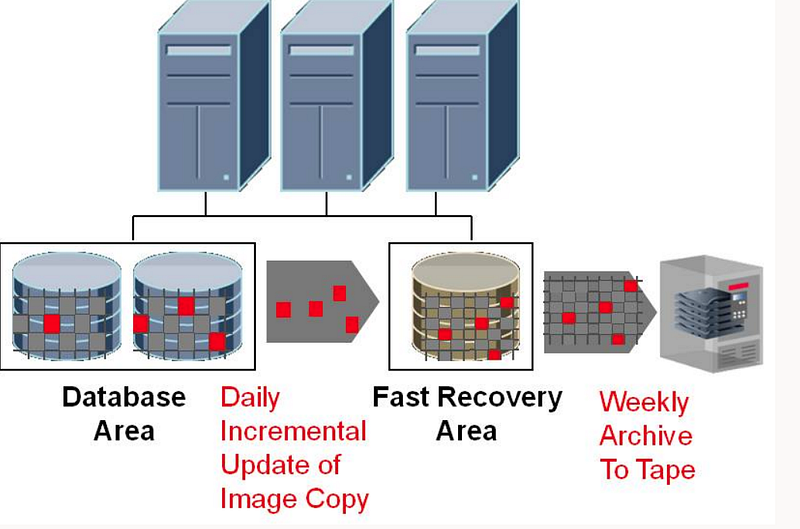
Oracle Recovery Manager (RMAN) is a powerful tool that provides backup and recovery capabilities for Oracle databases. Understanding the basic RMAN backup commands is crucial for database administrators to ensure data protection and availability. In this article, we’ll explore the fundamental RMAN backup commands and their functionalities.
Introduction to RMAN
RMAN is an integral part of Oracle’s backup and recovery strategy. It allows database administrators to perform backups, restore operations, and recover data efficiently. With RMAN, you can create backups of database files, archive logs, control files, and more.
Basic RMAN Backup Commands
1. Connecting to the Database
To connect to the target database using RMAN:
rman target /
rman target sys/password@YDKTST;
2. Backup Database
To perform a full database backup:
backup database;3. Backup Database with Format
To specify a backup format:
backup database format '/backup/path/%d_%t_%s.rman';4. Backup Specific Tablespaces
To backup specific tablespaces:
backup tablespace system, users;5. Backup Specific Datafiles
To backup specific datafiles:
backup datafile 1,3,45;6. Backup Archive Logs
To backup all archive logs:
BACKUP ARCHIVELOG ALL;7. Backup Archive Logs Based on Time, SCN, or Sequence
You can backup archive logs based on time, SCN (System Change Number), or sequence:
RMAN> BACKUP ARCHIVELOG UNTIL SCN = 320;
RMAN> BACKUP ARCHIVELOG UNTIL SEQUENCE = 501;
RMAN> BACKUP ARCHIVELOG UNTIL TIME 'SYSDATE-7';
8. Delete Backed Up Archive Logs
To delete backed up archive logs:
RMAN> BACKUP ARCHIVELOG ALL DELETE INPUT;9. Configure Controlfile Autobackup
To configure controlfile autobackup:
CONFIGURE CONTROLFILE AUTOBACKUP ON;
CONFIGURE CONTROLFILE AUTOBACKUP FORMAT FOR DEVICE TYPE DISK TO '/data2/backup/cf_%F.rman';
10. Backup Controlfile
To backup the current controlfile:
BACKUP CURRENT CONTROLFILE;11. Backup as Compressed Backupset
To perform a compressed backup:
BACKUP as COMPRESSED BACKUPSET DATABASE FORMAT '/data2/backup/dbf_%d_%t_%s.rman' TAG='DBF_CCEBI_20080620_1345' PLUS ARCHIVELOG format '/data2/backup/arc_%d_%t_%s.rman' TAG='ARC_CCEBI_20080620_1345';12. RMAN Backup Script
To schedule an RMAN backup using a script:
0 2 * * * rman target / <<EOF
RUN {
  ALLOCATE CHANNEL c1 DEVICE TYPE DISK;
  BACKUP DATABASE PLUS ARCHIVELOG;
  RELEASE CHANNEL c1;
}
EXIT;
EOF
Conclusion
Understanding the basic RMAN backup commands is essential for database administrators to effectively manage and protect Oracle databases. Whether you’re performing full database backups, backing up specific tablespaces or datafiles, or configuring controlfile autobackup, RMAN provides a comprehensive set of commands to meet your backup and recovery needs.
By mastering these basic RMAN backup commands, you can leverage the full potential of Oracle’s backup and recovery capabilities, thereby safeguarding your valuable data against potential disasters.
Happy backing up!