 ← PostgreSQL Blog
Creating Symbolic and Hard Links in Linux
Creating Symbolic and Hard Links in Linux
In Linux, you can create two types of links: symbolic (or soft) links and hard links. Both types allow you to reference a file from multiple locations without duplicating the file, but they work differently under the hood.
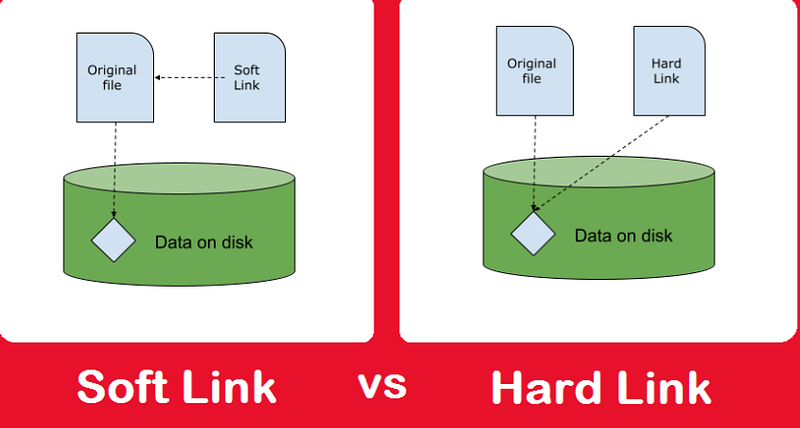
Symbolic Links
To create a symbolic link in Linux, you can use the following command syntax:
ln -s /path/to/source_file /path/to/symbolic_linkln: This is the command used to create links between files.-s: This option indicates that we are creating a symbolic (or soft) link./path/to/source_file: This is the path to the original file that you want to link to./path/to/symbolic_link: This is the path where you want to create the symbolic link.
Hard Links
To create a hard link in Linux, you can use the following command syntax:
ln /path/to/source_file /path/to/hard_linkln: This is the command used to create links between files./path/to/source_file: This is the path to the original file that you want to link to./path/to/hard_link: This is the path where you want to create the hard link.
Example
Symbolic Link
Let’s say you have a file named cat_ts.dbf located in the directory /den/a, and you want to create a symbolic link to this file in the directory /a.
You can create the symbolic link using the following command:
ln -s /den/a/cat_ts.dbf /aAfter running this command, a symbolic link named cat_ts.dbf will be created in the /a directory, pointing to the original file /den/a/cat_ts.dbf.
Hard Link
Now, let’s consider creating a hard link for the same file cat_ts.dbf.
ln /den/a/cat_ts.dbf /a/hard_link_cat_ts.dbfAfter running this command, a hard link named hard_link_cat_ts.dbf will be created in the /a directory, pointing to the same inode as the original file /den/a/cat_ts.dbf.
Explanation
- Symbolic Links: The
ln -scommand creates a new symbolic link. A symbolic link is a separate file that contains a reference to the original file or directory. It can span different file systems and even point to non-existent or remote files. - Hard Links: The
lncommand without the-soption creates a hard link. A hard link is another name for an existing file or directory on the same file system. All hard links to a file are essentially the same file, sharing the same inode. Removing one hard link does not affect the others, but the last remaining hard link to a file must be deleted to free up disk space.
Both symbolic and hard links have their use cases and advantages. Symbolic links are more flexible and can cross file system boundaries, while hard links are more rigid and can only be created for files (not directories) on the same file system.