 ← PostgreSQL Blog
Redo log disk artır
Increasing Redo Log Disk Space
Redo log files are of critical importance in Oracle databases. They serve as the place where database transactions are recorded, made recoverable, and data integrity is maintained. Managing and configuring these files is a crucial process for database administrators and involves specific steps.
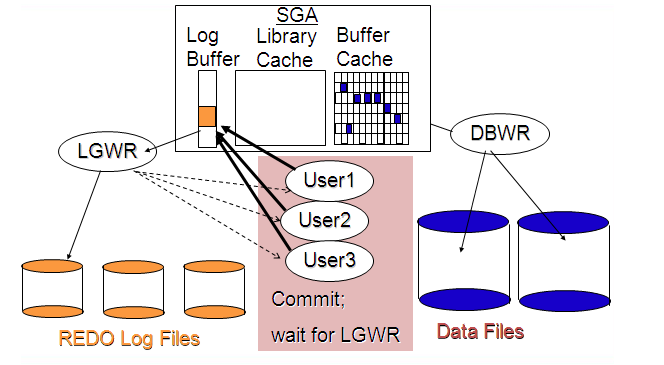
To manage redo log files, various SQL commands are used. For example, the command ALTER DATABASE DROP LOGFILE GROUP 5; removes a redo log file group, while ALTER DATABASE ADD LOGFILE GROUP 4 ('/u01/app/oracle/oradata/NCBS/redo04.log') SIZE 100M; adds a new redo log file group.
During these operations, you can use SELECT queries to view the status of redo log files. For instance, the query SELECT GROUP#, ARCHIVED, STATUS FROM V$LOG; displays the group numbers, whether they are archived or not, and their statuses. The command alter system switch logfile; switches to a new redo log file by rotating the current one.
Detailed information about the sizes and statuses of redo log files can be obtained through views like v$log. For example, the query SELECT group#, bytes/1024/1024 AS "Size (MB)" FROM v$log; displays the sizes of redo log files.
Managing and configuring redo log files is critical for the performance and reliability of the database. Proper execution of these steps is among the tasks of database administrators and ensures smooth database operations.
Examples:
SQL> SELECT GROUP#, ARCHIVED, STATUS FROM V$LOG;
GROUP# ARC STATUS
------ --- ------
 1     NO  CURRENT
 2     NO  ACTIVE
 3     NO  ACTIVE
 4     NO  ACTIVE
SQL> alter system switch logfile;
System altered.
SQL> SELECT GROUP#, ARCHIVED, STATUS FROM V$LOG;
GROUP# ARC STATUS
------ --- ------
 1     NO  ACTIVE
 2     NO  INACTIVE
 3     NO  CURRENT
 4     NO  INACTIVE
SQL> alter system checkpoint;
System altered.
SQL> alter database drop logfile group 4;
Database altered.
SQL> alter database add logfile group 4 '/u01/app/oracle/oradata/NCBS/redo004.log' size 1G;
Database altered.
SQL> SELECT GROUP#, bytes/1024/1024 AS "Size (MB)" FROM v$log;
GROUP# Size (MB)
------ ---------
 1     200
 2     200
 3     100
 4     1024
SQL> SELECT GROUP#, ARCHIVED, STATUS FROM V$LOG;
GROUP# ARC STATUS
------ --- ------
 1     NO  INACTIVE
 2     NO  INACTIVE
 3     NO  CURRENT
 4     YES UNUSED
SQL> alter system switch logfile;
System altered.
SQL> SELECT GROUP#, ARCHIVED, STATUS FROM V$LOG;
GROUP# ARC STATUS
------ --- ------
 1     NO  INACTIVE
 2     NO  INACTIVE
 3     NO  ACTIVE
 4     NO  CURRENT
In summary, managing redo log files is an essential aspect of Oracle database administration to maintain data integrity and ensure optimal performance.