 ← PostgreSQL Blog
Understanding Oracle 19c Table Shrink Space Commands
Understanding Oracle 19c Table Shrink Space Commands
Oracle Database 19c offers powerful commands to manage the storage space of tables efficiently. Among these commands are the ENABLE ROW MOVEMENT, SHRINK SPACE, and CASCADE options. Let's delve into each of these commands and understand their significance:
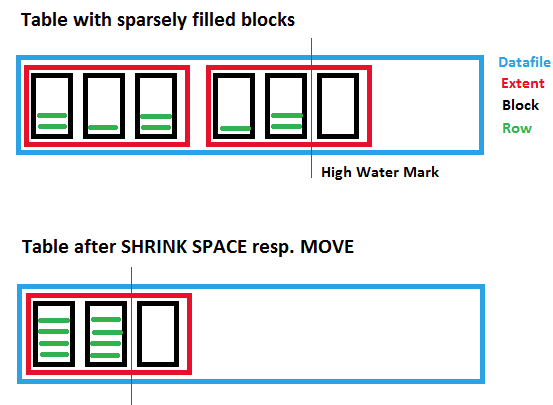
Enable Row Movement
ALTER TABLE ali.deneme ENABLE ROW MOVEMENT;The ENABLE ROW MOVEMENT command allows for the reorganization of rows within a table. This is particularly useful during space reclamation operations. When row movement is enabled, Oracle can move rows around within the table, facilitating operations like shrink space without requiring a table rebuild.
Shrink Space
ALTER TABLE ali.deneme SHRINK SPACE;The SHRINK SPACE command is used to reduce the space allocated to a table. By executing this command, Oracle will reclaim unused space within the table, potentially reducing the physical storage requirements. It's a useful operation to optimize storage usage and improve performance by reducing I/O operations.
Shrink Space with Cascade
ALTER TABLE ali.deneme SHRINK SPACE CASCADE;Adding the CASCADE option to the SHRINK SPACE command extends the shrink operation beyond just the table. It includes any associated indexes and dependent objects related to the table. This comprehensive shrink operation ensures that all related structures are optimized, providing a more thorough space reclamation.
Conclusion
Managing storage space efficiently is crucial for maintaining optimal performance and reducing costs in an Oracle Database environment. The ENABLE ROW MOVEMENT, SHRINK SPACE, and CASCADE commands in Oracle 19c provide administrators with powerful tools to achieve these objectives. Whether you're reorganizing rows, reclaiming unused space, or optimizing related structures, understanding and utilizing these commands can significantly enhance database management practices.