 ← PostgreSQL Blog
Creating and Publishing Your Python Library on PyPI
Creating and Publishing Your Python Library on PyPI
Creating your own Python library can be a rewarding experience. Sharing your code with the community allows others to benefit from your work and potentially contribute to it. In this guide, we’ll walk through the steps to create a Python library and publish it on PyPI, the Python Package Index.
First of all, create a folder an put your code as shown below figure.

Setup file can be above directory and may be include these codes;
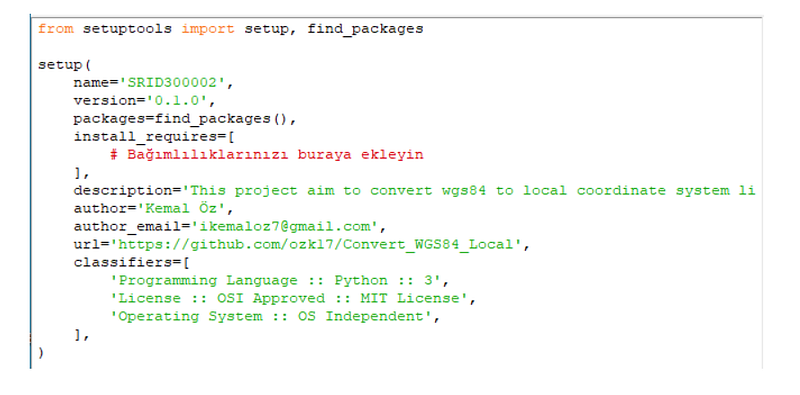
and SRID300002 file must be your libary name and include thir codes. and must be create — init — python. my — init — is empty.
Create PyPI Account:
You need a PyPI account to upload your library to PyPI. You can create an account at https://pypi.org.
Install Twine: You can use the tool called twine to install packages on PyPI. Enter the following command in the terminal to install Twine:
pip install twineBuild and Publish Your Package: You can publish your library by unpacking it and uploading it to PyPI. Make sure you are in the project directory and run the following commands in order:
#Create package
python setup.py sdist bdist_wheel

#Load PyPI
twine upload dist/*
and you can enter your username and password for pypi account.