 ← PostgreSQL Blog
Automatic Failover for Postgresql (Python — Etcd — Postgres — HAProxy)
PostgreSQL HA Cluster Installation with Patroni
PostgreSQL is an open-source relational database management system. To achieve High Availability (HA) with PostgreSQL, you can create a cluster using tools like Patroni. Patroni is an automation tool that provides an effective high availability solution for PostgreSQL.
Features and advantages of Patroni include:
1. Automation: Patroni automates the management of a PostgreSQL high availability cluster. Tasks such as failover, backups, and replication are handled automatically.
2. Timely Recovery: Patroni ensures automatic failover to a standby server as the new primary when the primary database server fails, ensuring uninterrupted service.
3. Flexibility: Patroni is compatible with various distributions and configurations of PostgreSQL, providing a flexible high availability solution.
4. Easy Installation and Management: Patroni’s installation and configuration are relatively straightforward, offering a user-friendly interface for managing the PostgreSQL cluster.
Using Patroni for setting up a PostgreSQL HA Cluster is an ideal option to meet high availability requirements and ensure seamless operation of database systems. This configuration is particularly important for mission-critical applications, ensuring that database services operate continuously and reliably.
Server Information;
Master  :10.**.**.67
Replica :10.**.**.68
HaProxy and etcd:10.**.**.66
Postgres setup steps;
sudo dnf -y install epel-release
dnf update
sudo dnf install -y https://download.postgresql.org/pub/repos/yum/reporpms/EL-9-x86_64/pgdg-redhat-repo-latest.noarch.rpm
sudo dnf install -y postgresql14-server
ln -s /usr/pgsql-14/bin/* /usr/sbin/
Create python virtual enviroment;
cd /usr/bin/
python3 -m venv myenv
source myenv/bin/activate
Patroni setup;
pip install psycopg2-binary
pip install patroni
pip install python-etcd
vi /etc/patroni/patroni.yml
nano /etc/patroni/patroni.yml

scope: postgres
namespace: /pg_cluster/
name: pg_node1

restapi:
    listen: 10.5.56.67:8008
    connect_address: 10.5.56.67:8008

etcd:
    host: 10.5.56.66:2379

log_dir: /var/log/patroni/

bootstrap:
    dcs:
        ttl: 30
        loop_wait: 10
        retry_timeout: 10
        maximum_lag_on_failover: 1048576
        postgresql:
            use_pg_rewind: true

    initdb:
    - encoding: UTF8
    - data-checksums

    pg_hba:
    - host replication repuser 127.0.0.1/32 md5
    - host replication repuser 10.*.**.**/0 md5
    - host replication repuser 10.*.**.**/0 md5
    - host all all 0.0.0.0/0 md5

    users:
        admin:
            password: admin
            options:
            - createrole
            - createdb

postgresql:
    listen: 10.5.56.67:5432
    connect_address: 10.5.56.67:5432
    data_dir: /postgre/data
    pgpass: /tmp/pgpass
    authentication:
        replication:
            username: repuser
            password: test123
        superuser:
            username: postgres
            password: test123
    parameters:
        unix_socket_directories: '.'

tags:
    nofailover: false
    noloadbalance: false
    clonefrom: false
    nosync: false
nano /etc/systemd/system/patroni.service
[Unit]
Description=Runners to orchestrate a high-availability Postgr>
After=syslog.target network.target

[Service]
Type=simple

User=postgres
Group=postgres

ExecStart=/usr/bin/myenv/bin/patroni /etc/patroni/patroni.yml
#/usr/bin/myenv/bin/patroni bu yolda olmasının sebebi patroni paketinin
#bu dizinin altında kurulmasından dolayıdır.

KillMode=process
TimeoutSec=30
Restart=no

[Install]
WantedBy=multi-user.target
systemctl daemon-reload
systemctl enable patroni
systemctl start patroni
sudo /usr/pgsql-14/bin/postgresql-14-setup initdb
Etcd
sudo dnf --enablerepo=pgdg-rhel9-extras install -y etcd
vi /etc/etcd/etcd.conf
ETCD_NAME=default
ETCD_DATA_DIR="/var/lib/etcd/default.etcd"
#ETCD_WAL_DIR=""
#ETCD_SNAPSHOT_COUNT="10000"
#ETCD_HEARTBEAT_INTERVAL="100"
#ETCD_ELECTION_TIMEOUT="1000"
ETCD_LISTEN_PEER_URLS="http://10.*.**.66:2380,http://127.0.0.1:7001"
ETCD_LISTEN_CLIENT_URLS="http://127.0.0.1:2379,http://10.*.**.66:2379"
#ETCD_MAX_SNAPSHOTS="5"
#ETCD_MAX_WALS="5"
#ETCD_CORS=""
#
#[cluster]
ETCD_INITIAL_ADVERTISE_PEER_URLS="http://10.*.**.66:2380"
# if you use different ETCD_NAME (e.g. test), set ETCD_INITIAL_CLUSTER value for this name, i.e. "test=http://..."
ETCD_INITIAL_CLUSTER="default=http://10.*.**.66:2380"
ETCD_INITIAL_CLUSTER_STATE="new"
ETCD_INITIAL_CLUSTER_TOKEN="etcd-cluster"
ETCD_ADVERTISE_CLIENT_URLS="http://10.*.**.66:2379"
#ETCD_DISCOVERY=""
#ETCD_DISCOVERY_SRV=""
#ETCD_DISCOVERY_FALLBACK="proxy"
#ETCD_DISCOVERY_PROXY=""
ETCD_ENABLE_V2="true"
#ETCD_STRICT_RECONFIG_CHECK="false"
#ETCD_AUTO_COMPACTION_RETENTION="0"
#
#[proxy]
#ETCD_PROXY="off"
#ETCD_PROXY_FAILURE_WAIT="5000"
#ETCD_PROXY_REFRESH_INTERVAL="30000"
#ETCD_PROXY_DIAL_TIMEOUT="1000"
#ETCD_PROXY_WRITE_TIMEOUT="5000"
#ETCD_PROXY_READ_TIMEOUT="0"
#
#[security]
#ETCD_CERT_FILE=""
#ETCD_KEY_FILE=""
#ETCD_CLIENT_CERT_AUTH="false"
#ETCD_TRUSTED_CA_FILE=""
#ETCD_AUTO_TLS="false"
#ETCD_PEER_CERT_FILE=""
#ETCD_PEER_KEY_FILE=""
#ETCD_PEER_CLIENT_CERT_AUTH="false"
#ETCD_PEER_TRUSTED_CA_FILE=""
#ETCD_PEER_AUTO_TLS="false"
#
#[logging]
#ETCD_DEBUG="false"
# examples for -log-package-levels etcdserver=WARNING,security=DEBUG
#ETCD_LOG_PACKAGE_LEVELS=""
Ha Proxy
yum -y install haproxy
cp -p /etc/haproxy/haproxy.cfg /etc/haproxy/haproxy.cfg.bkp (yedeğini al)
vi /etc/haproxy/haproxy.cfg
#---------------------------------------------------------------------
# Example configuration for a possible web application.  See the
# full configuration options online.
#
#   https://www.haproxy.org/download/1.8/doc/configuration.txt
#
#---------------------------------------------------------------------

#---------------------------------------------------------------------
# Global settings
#---------------------------------------------------------------------
global
    # to have these messages end up in /var/log/haproxy.log you will
    # need to:
    #
    # 1) configure syslog to accept network log events.  This is done
    #    by adding the '-r' option to the SYSLOGD_OPTIONS in
    #    /etc/sysconfig/syslog
    #
    # 2) configure local2 events to go to the /var/log/haproxy.log
    #   file. A line like the following can be added to
    #   /etc/sysconfig/syslog
    #
    #    local2.*                       /var/log/haproxy.log
    #
    log         127.0.0.1 local2

    chroot      /var/lib/haproxy
    pidfile     /run/haproxy.pid
    maxconn     4000
    user        haproxy
    group       haproxy
    daemon

    # turn on stats unix socket
    stats socket /var/lib/haproxy/stats

    # utilize system-wide crypto-policies
    ssl-default-bind-ciphers PROFILE=SYSTEM
    ssl-default-server-ciphers PROFILE=SYSTEM

#---------------------------------------------------------------------
# common defaults that all the 'listen' and 'backend' sections will
# use if not designated in their block
#---------------------------------------------------------------------
defaults
    mode                    http
    log                     global
    option                  httplog
    option                  dontlognull
    option http-server-close
    option forwardfor       except 127.0.0.0/8
    option                  redispatch
    retries                 3
    timeout http-request    10s
    timeout queue           1m
    timeout connect         10s
    timeout client          1m
    timeout server          1m
    timeout http-keep-alive 10s
    timeout check           10s
    maxconn                 3000

listen stats
    mode http
    bind *:7000
    stats enable
    stats uri /
listen primary
    bind *:5000
    option httpchk
    http-check expect status 200
    default-server inter 3s fall 3 rise 2 on-marked-down shutdown-sessions
    server cbspgmastertest.itu.edu.tr 10.*.**.67:5432 maxconn 1000 check port 8008
    server cbspgstandbytest.itu.edu.tr 10.*.**.68:5432 maxconn 1000 check port 8008

listen standby
    balance roundrobin
    bind *:5001
    option httpchk OPTIONS /replica
    http-check expect status 200
    default-server inter 3s fall 3 rise 2 on-marked-down shutdown-sessions
    server cbspgmastertest.itu.edu.tr 10.5.56.67:5432 maxconn 1000 check port 8008
    server cbspgstandbytest.itu.edu.tr 10.5.56.68:5432 maxconn 1000 check port 8008

#---------------------------------------------------------------------
# main frontend which proxys to the backends
#---------------------------------------------------------------------
frontend main
    bind *:5000
    acl url_static       path_beg       -i /static /images /javascript /stylesheets
    acl url_static       path_end       -i .jpg .gif .png .css .js

    use_backend static          if url_static
    default_backend             app

#---------------------------------------------------------------------
# static backend for serving up images, stylesheets and such
#---------------------------------------------------------------------
backend static
    balance     roundrobin
#    server      static 127.0.0.1:4331 check

#---------------------------------------------------------------------
# round robin balancing between the various backends
#---------------------------------------------------------------------
backend app
    balance     roundrobin
#    server  app1 127.0.0.1:5001 check
#    server  app2 127.0.0.1:5002 check
#    server  app3 127.0.0.1:5003 check
#    server  app4 127.0.0.1:5004 check
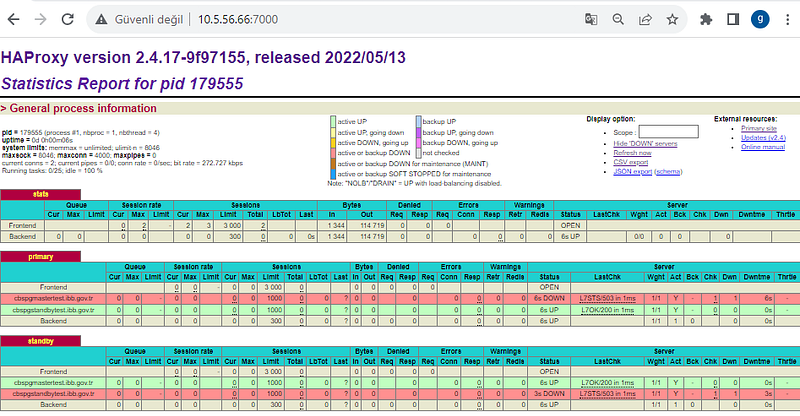
Düğümlerin durumlarını buradan gözlemleyebiliriz: http://10.*.**.66:7000/
patronictl -c /etc/patroni/patroni.yml list