 ← PostgreSQL Blog
Installation of HAProxy and Keepalived for High Availability
Installation of HAProxy and Keepalived for High Availability
Prerequisites
- Two RHEL 9 servers (10.102.71.192 &&10.102.71.192) and VIP (10.102.71.190).
- HAProxy and Keepalived should be installed on both servers.
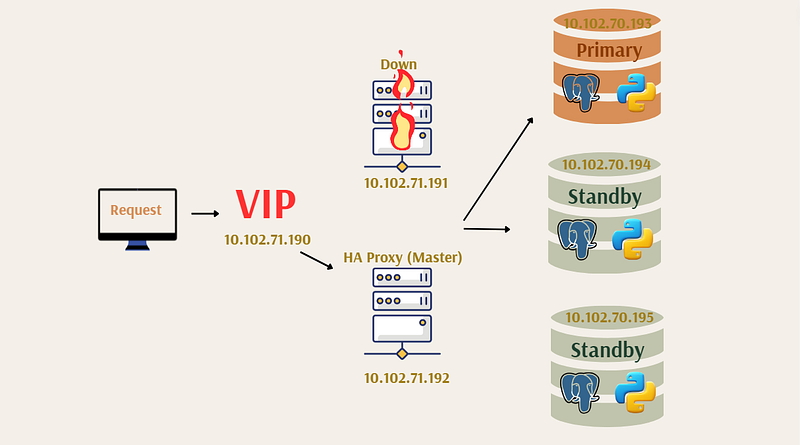
Step 1: HAProxy Installation
Install HAProxy on both servers. You can do this using the following commands:
dnf install haproxyYou can check haproxy service settings
vi /usr/lib/systemd/system/haproxy.serviceStep 2: HAProxy Configuration
Open HAProxy configuration file:
sudo nano /etc/haproxy/haproxy.cfgConfigure HAProxy on both servers as follows:
global
    maxconn 1000
    log 127.0.0.1 local0
defaults
    log global
    mode tcp
    retries 2
    timeout client 120m
    timeout connect 4s
    timeout server 120m
    timeout check 5s

listen stats
    mode http
    bind *:7000
    stats enable
    stats uri /

frontend a_listen_fe
#bind *:5001
#bind *:5000
acl is-read-service-dead nbsrv(standby) lt 1
use_backend postgres if is-read-service-dead
default_backend standby


listen postgres
        bind 10.102.71.190:5000
        option httpchk OPTIONS/master
        http-check expect status 200
        default-server inter 3s fall 4 rise 3 on-marked-down shutdown-sessions
        server node1 10.102.70.193:5432 maxconn 1000 check port 8008
        server node2 10.102.70.194:5432 maxconn 1000 check port 8008
        server node3 10.102.70.195:5432 maxconn 1000 check port 8008
        server node4 10.102.70.199:5432 maxconn 1000 check backup port 8008
listen standby
        bind 10.102.71.190:5001
        option httpchk OPTIONS/replica
        http-check expect status 200
        default-server inter 3s fall 4 rise 3 on-marked-down shutdown-sessions
        server node1 10.102.70.193:5432 maxconn 1000 check port 8008
        server node2 10.102.70.194:5432 maxconn 1000 check port 8008
        server node3 10.102.70.195:5432 maxconn 1000 check port 8008
        server node4 10.102.70.199:5432 maxconn 1000 check backup port 8008
Start haproxy services on both servers:
setsebool -P haproxy_connect_any=1

"""
This command sets the SELinux boolean haproxy_connect_any to 1,
allowing HAProxy to connect to any port, regardless of the SELinux policy.
The -P option makes the change permanent, so it persists across reboots.
"""

systemctl start haproxy.service
systemctl enable haproxy.service
systemctl status haproxy.service
Step 3: Keepalived Installation
Install Keepalived on both servers:
sudo dnf install keepalivedStep 4: Keepalived Configuration
Edit the Keepalived configuration file on both servers:
sudo nano /etc/keepalived/keepalived.confConfigure Keepalived as follows:
For Server 1 (keepalived1):
global_defs {
}
vrrp_script chk_haproxy {
    script "killall -0 haproxy" # widely used idiom
    interval 2 # check every 2 seconds
    weight 2 # add 2 points of prio if OK
}
vrrp_instance VI_1 {
    interface ens192
    state MASTER
    priority 101
    virtual_router_id 51
    authentication {
        auth_type PASS
        auth_pass Kls45f3d
    }
virtual_ipaddress {
        10.102.71.190/24
    }
unicast_src_ip 10.102.71.191  # This node
    unicast_peer {
    10.102.71.192                 # Other nodes
    }
track_script {
        chk_haproxy
    }
}
For Server 2 (keepalived2):
global_defs {
}
vrrp_script chk_haproxy {
    script "killall -0 haproxy" # widely used idiom
    interval 2 # check every 2 seconds
    weight 2 # add 2 points of prio if OK
}
vrrp_instance VI_1 {
    interface ens192
    state BACKUP
    priority 99
    virtual_router_id 51
    authentication {
        auth_type PASS
        auth_pass Kls45f3d
    }
virtual_ipaddress {
        10.102.71.190/24
    }
unicast_src_ip 10.102.71.192  # This node
    unicast_peer {
    10.102.71.191                 # Other nodes
    }
track_script {
        chk_haproxy
    }
}
Step 5: Starting the Services
Start Keepalived services on both servers:
sudo systemctl start keepalived
sudo systemctl enable keepalived
Conclusion
You have now completed the setup of a high availability service using HAProxy and Keepalived. Keepalived monitors the active server and performs traffic redirection using the Virtual IP (VIP) mechanism, ensuring uninterrupted service even in the event of server failure.
For more detailed and technical articles like this, keep following our blog on Medium. If you have any questions or need further assistance, feel free to reach out in the comments below and directly.