 ← PostgreSQL Blog
Understanding High Availability with HAProxy and Patroni: Manual Node Shutdown and Query Handling
Understanding High Availability with HAProxy and Patroni: Manual Node Shutdown and Query Handling
In high-availability PostgreSQL environments, managing failovers efficiently is crucial to ensure minimal disruption to ongoing operations. This guide will cover two main scenarios: the general high-availability information about HAProxy and Patroni, and handling running queries during a failover.
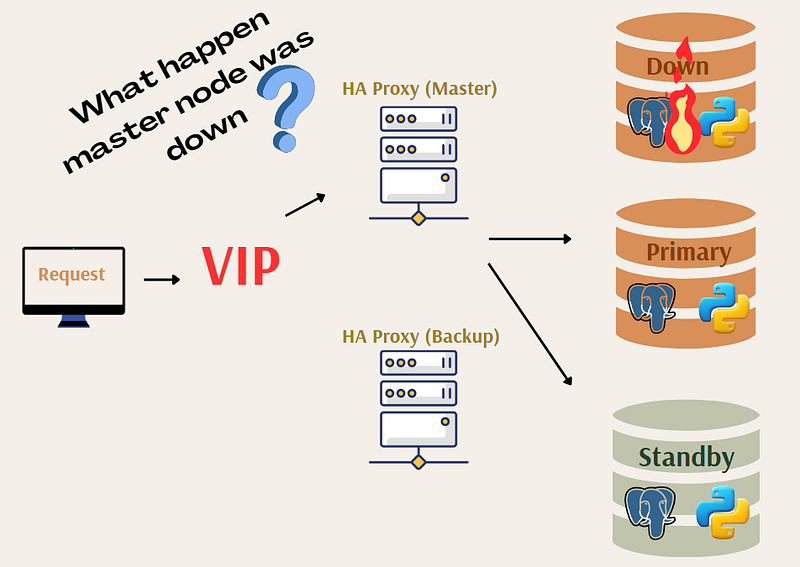
Part 1: High Availability Architecture with HAProxy and Patroni
The diagram illustrates a typical high-availability setup for PostgreSQL using HAProxy and Patroni. Here’s a detailed explanation of the components and their roles:
- VIP (Virtual IP): The VIP is a crucial element in high-availability configurations, ensuring that client requests are always directed to the active master node, regardless of which physical node that is.
- HAProxy (Master and Backup): HAProxy is used to manage and route the incoming database requests to the appropriate PostgreSQL node. In this setup, there are two HAProxy instances:
- Master HAProxy: Handles the primary routing of requests to the current leader node.
- Backup HAProxy: Takes over routing responsibilities if the master HAProxy fails.
3. PostgreSQL Nodes:
- Primary (Leader) Node: The main node that handles read and write operations.
- Standby (Replica) Node: Replicates data from the primary node and is ready to take over in case of a failure.
- Down Node: Illustrates a scenario where the current leader node fails.
When a master node goes down, the VIP ensures that requests are seamlessly rerouted to the new primary node. This automatic failover minimizes downtime and ensures continuous availability.
Part 2: Handling Running Queries During a Failover
In a high-availability setup managed by Patroni, manual interventions like node shutdowns are sometimes necessary. This part of the guide demonstrates the impact of such actions on running
Step 1: Checking the Cluster Status
First, verify the current status of your Patroni cluster. Use the following command to list the nodes and their roles within the cluster:
[root@cbspgstandbytest ~]# patronictl -c /etc/patroni/patroni.yml list
+ Cluster: denemek (7371333306787156048) -----+----+-----------+
| Member   | Host       | Role    | State     | TL | Lag in MB |
+----------+------------+---------+-----------+----+-----------+
| pg_node1 | 10.**.**.**7 | Leader  | running   | 45 |           |
| pg_node2 | 10.**.**.**8 | Replica | streaming | 45 |         0 |
| pg_node3 | 10.**.**.**9 | Replica | streaming | 45 |         0 |
+----------+------------+---------+-----------+----+-----------+
In this example, pg_node1 is the leader and pg_node2 is a replica.
Step 2: Connecting to the Leader Node
Connect to the PostgreSQL database running on the leader node:
[postgres@cbspgbackuptest ~]$ psql -h 10.**.**.** -p 5000
Password for user postgres:
psql (14.10)
SSL connection (protocol: TLSv1.3, cipher: TLS_AES_256_GCM_SHA384, bits: 256, compression: off)
Type "help" for help.
Step 3: Creating and Populating a Table
Create a new table and insert a large number of records to simulate a long-running query:
postgres=# create table failover (test int);
CREATE TABLE

postgres=# insert into failover (test) select generate_series(1, 100000000);
Step 4: Manually Shutting Down the Leader Node
While the query is running, manually reboot the leader node (pg_node1):
rebootStep 5: Observing the Failover Process
Once the leader node is rebooted, you will see an error in the query session:
FATAL:  terminating connection due to administrator command
SSL connection has been closed unexpectedly
The connection to the server was lost. Attempting reset: Failed.
Despite the interruption, Patroni handles the failover process. The replica node (pg_node2) will take over as the new leader. Verify the new cluster status:
[root@cbspgstandbytest ~]# patronictl -c /etc/patroni/patroni.yml list
+ Cluster: denemek (7371333306787156048) -----+----+-----------+
| Member   | Host       | Role    | State     | TL | Lag in MB |
+----------+------------+---------+-----------+----+-----------+
| pg_node2 | 10.**.**.**8 | Leader  | running   | 46 |           |
| pg_node3 | 10.**.**.**9 | Replica | streaming | 46 |         0 |
| pg_node1 | 10.**.**.**7 | Replica | stopped   | 45 |           |
+----------+------------+---------+-----------+----+-----------+
Step 6: Reconnecting and Resuming Operations
Reconnect to the new leader node (pg_node2):
[postgres@cbspgbackuptest ~]$ psql -h 10.**.**.** -p 5000
Password for user postgres:
psql (14.10)
SSL connection (protocol: TLSv1.3, cipher: TLS_AES_256_GCM_SHA384, bits: 256, compression: off)
Type "help" for help.
Resubmit the query if necessary. The failover process ensures minimal disruption and continuity of operations.
Conclusion
When a leader node fails, any running queries will be terminated and will need to be resubmitted on the new leader node. This can cause disruptions on the client side, highlighting the importance of understanding failover processes and being prepared to handle such scenarios in a production environment. Patroni is an excellent tool for managing high availability in PostgreSQL, however, no system is entirely immune to disruptions during failovers. Some advanced architectures, like those used by distributed SQL databases (e.g., Google Spanner or CockroachDB), are designed to minimize or eliminate downtime and disruptions by using sophisticated consensus algorithms and geographically distributed nodes. Understanding the specific failover mechanisms and behavior of your chosen database system is crucial to maintaining high availability and ensuring that your applications can handle disruptions smoothly. For more detailed and technical articles like this, keep following our blog on Medium. If you have any questions or need further assistance, feel free to reach out in the comments below and directly.