 ← PostgreSQL Blog
Similarity in Postgres using Trigrams
Similarity in Postgres using Trigrams
Introduction to Similarity Matching
Data similarity matching is crucial for various applications, from search functionality to data cleaning. PostgreSQL offers powerful extensions like pg_trgm and fuzzystrmatch to facilitate these tasks by providing advanced text search and comparison capabilities.
Installing pg_trgm and fuzzystrmatch
To get started, you need to install both extensions in your PostgreSQL database. Here’s how:
Install the extensions:
CREATE EXTENSION pg_trgm;
CREATE EXTENSION fuzzystrmatch;
Verify the installations. You can check the available extensions by navigating to Operations > Extensions in your service overview.
Using pg_trgm for Similarity Matching
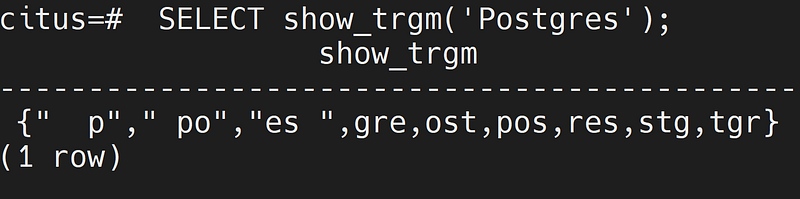
The pg_trgm extension uses trigrams (three consecutive characters from a string) to measure similarity. Here’s how you can use it:
- Calculate Similarity: The
similarity(text, text)function returns a value between 0 and 1, where 1 indicates identical strings.
ELECT similarity('Postgresql', 'Postgres');
 similarity
------------
0.6666667- Find Similar Records: Use the
%operator to find records with similar strings. For instance, the following query finds names in thestudentstable that are similar to 'kemal':
SELECT * FROM students WHERE name % 'kemal';- Example results:
name  |  number
-------+----------
Kemal | 10170523
Cemal | 10170524- Additional examples:
SELECT * FROM students WHERE name % 'kenal';

name  |  number
-------+----------
Kemal | 10170523
Kenan | 10170525


SELECT * FROM students WHERE name % 'kenam';

name  |  number
-------+----------
Kenan | 10170525
Using fuzzystrmatch for Advanced String Matching
The fuzzystrmatch extension provides additional string matching functions, including sound-based and Levenshtein distance algorithms:
- Soundex: The
soundex(text)function converts a string to its Soundex code, useful for phonetic matching.
ELECT soundex('Postgres');
 soundex
---------
 P232
(1 row)- Difference: The
difference(text, text)function compares the Soundex codes of two strings and returns a score from 0 to 4, with 4 indicating identical codes.
 SELECT difference ('postgres','postgras');
 difference
------------
          4
- Levenshtein Distance: The
levenshtein(text1, text2)function calculates the number of single-character edits required to change one string into the other.
SELECT levenshtein('postgres', 'postgresql');
 levenshtein
-------------
           2
(1 row)


SELECT levenshtein('postgresq', 'postgresql');
 levenshtein
-------------
           1
(1 row)


SELECT levenshtein('postgresql', 'postgresql');
 levenshtein
-------------
           0
(1 row)
By combining the capabilities of pg_trgm and fuzzystrmatch, you can significantly enhance your PostgreSQL database's text search and data matching functionalities. These extensions provide a robust toolkit for efficiently handling various text comparison tasks, making your applications more accurate and user-friendly. For more detailed and technical articles like this, keep following our blog on Medium. If you have any questions or need further assistance, feel free to reach out in the comments below and directly.