 ← PostgreSQL Blog
Enhancing PostgreSQL Performance with Tablespaces
Enhancing PostgreSQL Performance with Tablespaces
In PostgreSQL, tablespaces are a powerful feature that can help you manage disk storage and optimize performance. This article delves into the creation, usage, and management of tablespaces in PostgreSQL, highlighting their benefits and providing practical examples.
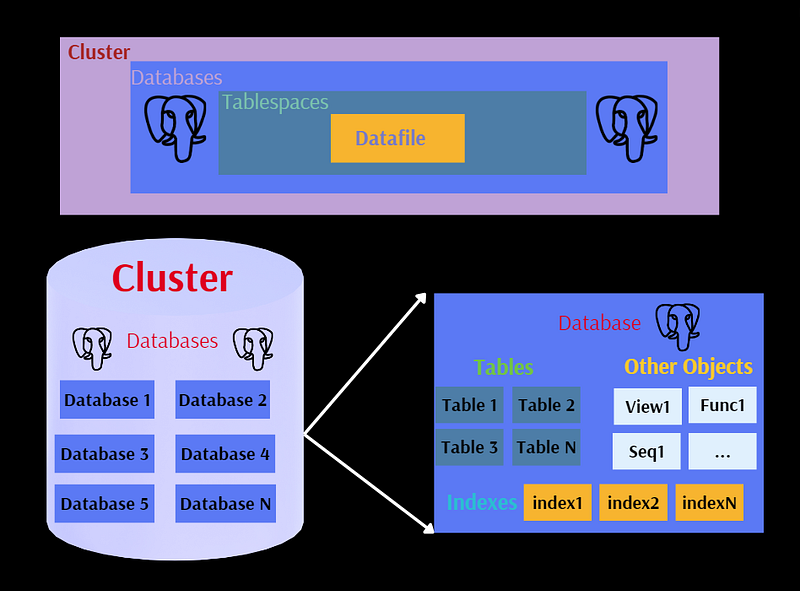
What are Tablespaces?
Tablespaces in PostgreSQL are storage locations where database objects, such as tables and indexes, can be stored. They allow you to extend the capacity of your storage and optimize performance by leveraging different types of storage devices.
Why Use Tablespaces?
There are two primary reasons to use tablespaces:
- Extending Disk Capacity: By adding data to separate disk devices, you can effectively increase the storage capacity beyond what a single disk can provide.
- Performance Optimization: You can improve the performance of certain operations by strategically placing data on different storage devices. For example, placing heavily accessed indexes on fast SSDs while storing rarely accessed historical data on slower, cheaper mechanical disks.
Creating and Managing Tablespaces
Creating a Tablespace
To create a new tablespace, you can use the CREATE TABLESPACE command. For instance, if you have a solid-state disk mounted at /ssd1/tblspace1, you can create a tablespace as follows:
CREATE TABLESPACE bim_tblspce LOCATION '/ssd1/tblspce1';Creating a Database with a Specific Tablespace
You can also create a database that uses a specific tablespace:
CREATE DATABASE cbsm TABLESPACE bim_tblspce;Example: Creating and Using a Tablespace
Here’s a step-by-step example:
Create a tablespace:
CREATE TABLESPACE bim_tblspce2 LOCATION '/ssd1/tblspce2';Create a table in the new tablespace:
CREATE TABLE student(id integer) TABLESPACE bim_tblspce2;Create a database with the new tablespace:
CREATE DATABASE bim WITH TABLESPACE = bim_tblspce2;Check the default tablespace settings:
SHOW default_tablespace;

SHOW temp_tablespaces;
Dropping Tablespaces and Moving Objects
You can drop a tablespace with the DROP TABLESPACE command. However, you must first ensure that no objects are using it. You can move objects from one tablespace to another using the ALTER command:
ALTER TABLE student SET TABLESPACE pg_default;

ALTER TABLE ALL IN TABLESPACE space2 SET TABLESPACE pg_default;

ALTER DATABASE bim_db SET TABLESPACE pg_default;
Viewing Tablespace Information
To view information about the tablespaces, you can run:
SELECT spcname AS "Name",
       pg_catalog.pg_get_userbyid(spcowner) AS "Owner",
       pg_catalog.pg_tablespace_location(oid) AS "Location",
       pg_catalog.array_to_string(spcacl, E'\n') AS "Access privileges",
       spcoptions AS "Options",
       pg_catalog.pg_size_pretty(pg_catalog.pg_tablespace_size(oid)) AS "Size",
       pg_catalog.shobj_description(oid, 'pg_tablespace') AS "Description"
FROM pg_catalog.pg_tablespace
ORDER BY 1;


     Name     |  Owner   |        Location         | Access privileges | Options |  Size   | Description
--------------+----------+-------------------------+-------------------+---------+---------+-------------
 bim_tblspce  | postgres | /ssd1/tblspce1          |                   |         | 264 GB  |
 bim_tblspce2 | postgres | /ssd1/tblspce2          |                   |         | 464 GB  |
 pg_default   | postgres |                         |                   |         | 937 GB  |
 pg_global    | postgres |                         |                   |         | 560 kB  |
(4 rows)
Using Temporary Tablespaces
Temporary tablespaces can be beneficial for managing temporary data efficiently. Here’s how to create and use a temporary tablespace:
Create a temporary tablespace:
CREATE TABLESPACE temp_ts LOCATION '/pg_temp';Set the temporary tablespace in the system configuration:
ALTER SYSTEM SET temp_tablespaces = 'temp_ts';

SELECT pg_reload_conf();
Verify the temporary tablespace setting:
SHOW temp_tablespaces;Create and manage temporary tables using the temporary tablespace:
CREATE TEMPORARY TABLE tmp1 (a int, b text, c date);

INSERT INTO tmp1 (a, b, c) SELECT i, i::text, NOW() FROM generate_series(1, 100) i;
Monitoring and Managing Temporary Files
You can monitor and manage temporary files using the log_temp_files setting:
Show the current setting:
SHOW log_temp_files;Set a temporary file limit:
ALTER SYSTEM SET log_temp_files = 0; -- Check the log file

SELECT pg_reload_conf();
Create a temporary table to generate temporary files:
CREATE TEMPORARY TABLE tmp4 AS SELECT * FROM generate_series(1, 10000);Reset the temporary file limit:
RESET temp_file_limit;Conclusion
Tablespaces in PostgreSQL provide a flexible and efficient way to manage storage and optimize database performance. By strategically placing data and indexes on different storage devices, you can enhance the overall performance of your database system. This guide has covered the essential aspects of creating, using, and managing tablespaces, enabling you to leverage their full potential in your PostgreSQL environment. For more detailed and technical articles like this, keep following our blog on Medium. If you have any questions or need further assistance, feel free to reach out in the comments below and directly.