 ← PostgreSQL Blog
High Available PostgreSQL Cluster Arhitecture
High Available PostgreSQL Cluster Arhitecture
Introduction
In this document, we will set up a PostgreSQL Patroni Cluster step by step. Our goal is to create a highly available PostgreSQL cluster. The installation process will follow these steps:
- Etcd Cluster Installation
- PostgreSQL + Patroni Installation
- HAProxy + Keepalived Installation
- pgBackRest Backup Solution Setup
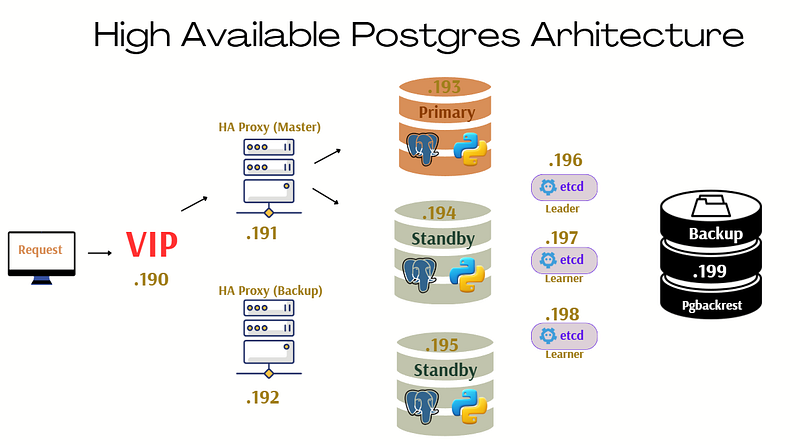
We will use the following server infrastructure:
- .190 → VIP
- .191 → HAProxy Primary Node
- .192 → HAProxy Secondary Node
- .193 → PostgreSQL Node 1
- .194 → PostgreSQL Node 2
- .195 → PostgreSQL Node 3
- .196 → Etcd Node 1
- .197 → Etcd Node 2
- .198 → Etcd Node 3
- .199 → Backup Node
Now, let’s proceed with the first step: Etcd Cluster Installation.
Etcd Installation
Etcd is a key-value store service used by Patroni for distributed database management. We will set up a three-node etcd cluster.
Step 1: Install Etcd Binaries
Perform the following steps on all etcd nodes:
dnf -y install curl wget vim

ETCD_RELEASE=$(curl -s https://api.github.com/repos/etcd-io/etcd/releases/latest | grep tag_name | cut -d '"' -f 4)

echo $ETCD_RELEASE

wget https://github.com/etcd-io/etcd/releases/download/${ETCD_RELEASE}/etcd-${ETCD_RELEASE}-linux-amd64.tar.gz

tar xvf etcd-${ETCD_RELEASE}-linux-amd64.tar.gz

cd etcd-${ETCD_RELEASE}-linux-amd64

mv etcd* /usr/local/bin

ls /usr/local/bin

etcd --version
etcdctl version
etcdutl version
Step 2: Create Directories and Users
mkdir -p /var/lib/etcd/
mkdir /etc/etcd
groupadd --system etcd
useradd -s /sbin/nologin --system -g etcd etcd
chown -R etcd:etcd /var/lib/etcd/ && chmod 0775 /var/lib/etcd/
Step 3: Systemd Service File
# vi /etc/systemd/system/etcd.service

[Unit]
Description=Etcd - Highly Available Key Value Store
Documentation=man:etcd
After=network.target
Wants=network-online.target

[Service]
Environment=DAEMON_ARGS=
Environment=ETCD_NAME=%H
Environment=ETCD_DATA_DIR=/var/lib/etcd/default
EnvironmentFile=/etc/etcd/etcd.conf
Type=notify
User=etcd
PermissionsStartOnly=true
ExecStart=/usr/local/bin/etcd $DAEMON_ARGS
Restart=on-abnormal
LimitNOFILE=65536
[Install]
WantedBy=multi-user.target
Step 4: Etcd Configuration
Etcd Node 1 (.196 )
# cat /etc/etcd/etcd.conf
[Member]
ETCD_LISTEN_PEER_URLS="http://**.**.**.196:2380,http://localhost:2380"
ETCD_LISTEN_CLIENT_URLS="http://localhost:2379,http://**.**.**.196:2379"
ETCD_DATA_DIR="/var/lib/etcd/default"

[Clustering]
ETCD_INITIAL_ADVERTISE_PEER_URLS="http://**.**.**.196:2380"
ETCD_ADVERTISE_CLIENT_URLS="http://**.**.**.196:2379"
ETCD_INITIAL_CLUSTER="etcd1=http://**.**.**.196:2380,etcd2=http://**.**.**.197:2380,etcd3=http://**.**.**.198:2380"
ETCD_INITIAL_CLUSTER_TOKEN="etcd-cluster"
ETCD_INITIAL_CLUSTER_STATE="new"
ETCD_NAME="etcd1"
ETCD_ELECTION_TIMEOUT=5000
ETCD_HEARTBEAT_INTERVAL=1000
ETCD_ENABLE_V2=true
Etcd Node 2 (.197)
# cat /etc/etcd/etcd.conf
[Member]
ETCD_LISTEN_PEER_URLS="http://**.**.**.197:2380,http://localhost:2380"
ETCD_LISTEN_CLIENT_URLS="http://localhost:2379,http://**.**.**.197:2379"
ETCD_DATA_DIR="/var/lib/etcd/default"

[Clustering]
ETCD_INITIAL_ADVERTISE_PEER_URLS="http://**.**.**.196:2380"
ETCD_ADVERTISE_CLIENT_URLS="http://**.**.**.197:2379"
ETCD_INITIAL_CLUSTER="etcd1=http://**.**.**.196:2380,etcd2=http://**.**.**.197:2380,etcd3=http://**.**.**.198:2380"
ETCD_INITIAL_CLUSTER_TOKEN="etcd-cluster"
ETCD_INITIAL_CLUSTER_STATE="new"
ETCD_NAME="etcd2"
ETCD_ELECTION_TIMEOUT=5000
ETCD_HEARTBEAT_INTERVAL=1000
ETCD_ENABLE_V2=true
Etcd Node 3 (.198)
# cat /etc/etcd/etcd.conf
[Member]
ETCD_LISTEN_PEER_URLS="http://**.**.**.198:2380,http://localhost:2380"
ETCD_LISTEN_CLIENT_URLS="http://localhost:2379,http://**.**.**.198:2379"
ETCD_DATA_DIR="/var/lib/etcd/default"

[Clustering]
ETCD_INITIAL_ADVERTISE_PEER_URLS="http://**.**.**.198:2380"
ETCD_ADVERTISE_CLIENT_URLS="http://**.**.**.198:2379"
ETCD_INITIAL_CLUSTER="etcd1=http://**.**.**.196:2380,etcd2=http://**.**.**.197:2380,etcd3=http://**.**.**.198:2380"
ETCD_INITIAL_CLUSTER_TOKEN="etcd-cluster"
ETCD_INITIAL_CLUSTER_STATE="new"
ETCD_NAME="etcd3"
ETCD_ELECTION_TIMEOUT=5000
ETCD_HEARTBEAT_INTERVAL=1000
ETCD_ENABLE_V2=true
Step 4: Start Etcd Service
systemctl enable etcd
systemctl start etcd
systemctl status etcd
Step 5: Verify Etcd Cluster Status
etcdctl member list

etcdctl --endpoints=**.**.**.196:2379,**.**.**.197:2379,**.**.**.198:2379 endpoint status --write-out=table

Expected output:
+------------------+------------------+---------+---------+-----------+------------+-----------+------------+--------------------+--------+
|     ENDPOINT     |        ID        | VERSION | DB SIZE | IS LEADER | IS LEARNER | RAFT TERM | RAFT INDEX | RAFT APPLIED INDEX | ERRORS |
+------------------+------------------+---------+---------+-----------+------------+-----------+------------+--------------------+--------+
| **.**.**.196:2379 |  84ebce0bfc393c1 |  3.5.11 |   29 kB |     false |      false |        40 |  100512574 |          100512574 |        |
| **.**.**.197:2379 | 76d84aedaf38bba4 |  3.5.11 |   29 kB |      true |      false |        40 |  100512574 |          100512574 |        |
| **.**.**.198:2379 |  b3d60bce62f139c |  3.5.11 |   29 kB |     false |      false |        40 |  100512574 |          100512574 |        |
+------------------+------------------+---------+---------+-----------+------------+-----------+------------+--------------------+--------+
Patroni Installation Guide
Step 1: Installing Required Packages
# apply each postgres node
dnf -y install https://dl.fedoraproject.org/pub/epel/epel-release-latest-9.noarch.rpm #(https://yum.postgresql.org/)

dnf install -y https://download.postgresql.org/pub/repos/yum/reporpms/EL-9-x86_64/pgdg-redhat-repo-latest.noarch.rpm

dnf -qy module disable postgresql

# Install PostgreSQL:
dnf install -y postgresql13-server
dnf install -y postgresql13-contrib
dnf install -y postgresql13-devel

# Install Patroni
yum install patroni
yum install python3-urllib3
yum install patroni-etcd.x86_64

cp -p /usr/share/doc/patroni/postgres0.yml /etc/patroni/patroni.yml
Step 2: Node 1 (.193) Configuration
#vi /etc/patroni/patroni.yml
----------------------------

scope: cluster
namespace: /var/lib/pgsql/config/
name: node1
restapi:
    listen: **.**.**.193:8008
    connect_address: **.**.**.193:8008
etcd:
    host: **.**.**.196:2379
    host: **.**.**.197:2379
    host: **.**.**.198:2379
bootstrap:
  dcs:
    ttl: 30
    loop_wait: 10
    retry_timeout: 10
    maximum_lag_on_failover: 1048576
    postgresql:
      use_pg_rewind: true
      use_slots: true
      parameters:
  initdb:
  - encoding: UTF8
  - data-checksums
  - waldir: /pg_wal
  - wal-segsize=512
  pg_hba:
  - host replication replicator 127.0.0.1/32 scram-sha-256
  - host replication replicator **.**.**.193/32 scram-sha-256
  - host replication replicator **.**.**.194/32 scram-sha-256
  - host replication replicator **.**.**.195/32 scram-sha-256
  - host all all **.**.**.***/24 scram-sha-256 # Please separate your database usage per node per IP block for system security
  users:
    admin:
      password: admin
      options:
        - createrole
        - createdb
postgresql:
  listen: **.**.**.193:5432
  connect_address: **.**.**.193:5432
  data_dir: /pg_data/data
  bin_dir: /usr/pgsql-13/bin
  pgpass: /tmp/pgpass
  authentication:
    replication:
      username: replicator
      password: test123
    superuser:
      username: postgres
      password: test123
  create_replica_methods:
    - pgbackrest
    - basebackup
  pgbackrest:
   command: pgbackrest --stanza=pg_backup restore --type=none
   keep_data: True
   no_params: True
  basebackup:
    checkpoint: 'fast'
tags:
    nofailover: false
    noloadbalance: false
    clonefrom: false
    nosync: false
Step 3: Node 2 (.194) Configuration
# vi /etc/patroni/patroni.yml
----------------------------
scope: cluster
namespace: /var/lib/pgsql/config/
name: node2
restapi:
    listen: **.**.**.194:8008
    connect_address: **.**.**.194:8008
etcd:
    host: **.**.**.196:2379
    host: **.**.**.197:2379
    host: **.**.**.198:2379
bootstrap:
  dcs:
    ttl: 30
    loop_wait: 10
    retry_timeout: 10
    maximum_lag_on_failover: 1048576
    postgresql:
      use_pg_rewind: true
      use_slots: true
      parameters:
  initdb:
  - encoding: UTF8
  - data-checksums
  - waldir: /pg_wal
  - wal-segsize=512
  pg_hba:
  - host replication replicator 127.0.0.1/32 scram-sha-256
  - host replication replicator **.**.**.193/32 scram-sha-256
  - host replication replicator **.**.**.194/32 scram-sha-256
  - host replication replicator **.**.**.195/32 scram-sha-256
  - host all all **.**.**.***/24 scram-sha-256 # Please separate your database usage per node per IP block for system security
  users:
    admin:
      password: admin
      options:
        - createrole
        - createdb
postgresql:
  listen: **.**.**.194:5432
  connect_address: **.**.**.194:5432
  data_dir: /pg_data/data
  bin_dir: /usr/pgsql-13/bin
  pgpass: /tmp/pgpass
  authentication:
    replication:
      username: replicator
      password: test123
    superuser:
      username: postgres
      password: test123
  create_replica_methods:
    - pgbackrest
    - basebackup
  pgbackrest:
   command: pgbackrest --stanza=pg_backup restore --type=none
   keep_data: True
   no_params: True
  basebackup:
    checkpoint: 'fast'
tags:
    nofailover: false
    noloadbalance: false
    clonefrom: false
    nosync: false
Step 4: Node 3 (.195) Configuration
# vi /etc/patroni/patroni.yml
----------------------------

scope: cluster
namespace: /var/lib/pgsql/config/
name: node3
restapi:
    listen: **.**.**.195:8008
    connect_address: **.**.**.195:8008
etcd:
    host: **.**.**.196:2379
    host: **.**.**.197:2379
    host: **.**.**.198:2379
bootstrap:
  dcs:
    ttl: 30
    loop_wait: 10
    retry_timeout: 10
    maximum_lag_on_failover: 1048576
    postgresql:
      use_pg_rewind: true
      use_slots: true
      parameters:
  initdb:
  - encoding: UTF8
  - data-checksums
  - waldir: /pg_wal
  - wal-segsize=512
  pg_hba:
  - host replication replicator 127.0.0.1/32 scram-sha-256
  - host replication replicator **.**.**.193/32 scram-sha-256
  - host replication replicator **.**.**.194/32 scram-sha-256
  - host replication replicator **.**.**.195/32 scram-sha-256
  - host all all **.**.**.***/24 scram-sha-256 # Please separate your database usage per node per IP block for system security
  users:
    admin:
      password: admin
      options:
        - createrole
        - createdb
postgresql:
  listen: **.**.**.195:5432
  connect_address: **.**.**.195:5432
  data_dir: /pg_data/data
  bin_dir: /usr/pgsql-13/bin
  pgpass: /tmp/pgpass
  authentication:
    replication:
      username: replicator
      password: test123
    superuser:
      username: postgres
      password: test123
  create_replica_methods:
    - pgbackrest
    - basebackup
  pgbackrest:
   command: pgbackrest --stanza=pg_backup restore --type=none
   keep_data: True
   no_params: True
  basebackup:
    checkpoint: 'fast'
tags:
    nofailover: false
    noloadbalance: false
    clonefrom: false
    nosync: false
Step 5: Start Patroni Service
systemctl enable patroni
systemctl start patroni
systemctl status patroni
Step 6: Check Cluster Status
patronictl -c /etc/patroni/patroni.yml list

Expected Output:
+ Cluster: cluster --+---------+-----------+----+-----------+
| Member   | Host        | Role    | State     | TL | Lag in MB |
+----------+-------------+---------+-----------+----+-----------+
| node1    | **.**.**.193 | Replica | streaming |  2 |         0 |
| node2    | **.**.**.194 | Leader  | running   |  2 |           |
| node3    | **.**.**.195 | Replica | streaming |  2 |         0 |
+----------+-------------+---------+-----------+----+-----------+
HAProxy Installation
Step 1: Installing Required Package
dnf install haproxy.x86_64 Step 2: Configure HAProxy for Primary Node
# vim /etc/haproxy/haproxy.cfg
#for master haproxy node

global
    maxconn 1000
    log 127.0.0.1 local0
defaults
    log global
    mode tcp
    retries 2
    timeout client 20m
    timeout connect 4s
    timeout server 20m
    timeout check 5s

listen stats
    mode http
    bind *:7000
    stats enable
    stats uri /

frontend a_listen_fe
#bind *:5000
#bind *:5001
acl is-read-service-dead nbsrv(standby) lt 1
use_backend postgres if is-read-service-dead
default_backend standby


listen postgres
        bind **.**.**.190:5000
        option httpchk OPTIONS/master
        http-check expect status 200
        default-server inter 3s fall 4 rise 3 on-marked-down shutdown-sessions
        server node1 **.**.**.193:5432 maxconn 1000 check port 8008
        server node2 **.**.**.194:5432 maxconn 1000 check port 8008
        server node3 **.**.**.195:5432 maxconn 1000 check port 8008
        server node4 **.**.**.199:5432 maxconn 1000 check backup port 8008
listen standby
        bind **.**.**.190:5001
        option httpchk OPTIONS/replica
        http-check expect status 200
        default-server inter 3s fall 4 rise 3 on-marked-down shutdown-sessions
        server node1 **.**.**.193:5432 maxconn 1000 check port 8008
        server node2 **.**.**.194:5432 maxconn 1000 check port 8008
        server node3 **.**.**.195:5432 maxconn 1000 check port 8008
Step 3: Configure HAProxy for Secondary Node
#for Secondary haproxy node
# -----------------------
global
    maxconn 100
    log 127.0.0.1 local0
defaults
    log global
    mode tcp
    retries 2
    timeout client 120m
    timeout connect 4s
    timeout server 120m
    timeout check 5s

listen stats
    mode http
    bind *:7000
    stats enable
    stats uri /

frontend a_listen_fe
#bind *:5000
#bind *:5000
acl is-read-service-dead nbsrv(standby) lt 1
use_backend postgres if is-read-service-dead
default_backend standby


listen postgres
        bind **.**.**.190:5000
        option httpchk OPTIONS/master
        http-check expect status 200
        default-server inter 3s fall 4 rise 3 on-marked-down shutdown-sessions
        server node1 **.**.**.193:5432 maxconn 1000 check port 8008
        server node2 **.**.**.194:5432 maxconn 1000 check port 8008
        server node3 **.**.**.195:5432 maxconn 1000 check port 8008
        server node4 **.**.**.199:5432 maxconn 1000 check backup port 8008
listen standby
        bind **.**.**.190:5001
        option httpchk OPTIONS/replica
        http-check expect status 200
        default-server inter 3s fall 4 rise 3 on-marked-down shutdown-sessions
        server node1 **.**.**.193:5432 maxconn 1000 check port 8008
        server node2 **.**.**.194:5432 maxconn 1000 check port 8008
        server node3 **.**.**.195:5432 maxconn 1000 check port 8008
Step 4: Ceck HAProxy Status
systemctl start haproxy.service
systemctl status haproxy.service
systemctl enable haproxy.service
Keepalived Installation
Step 1: Installing Required Package
dnf install keepalived.x86_64Step 2: Configure Keepalived for Primary Node
#for Primary haproxy node
#-----------------------
# vi /etc/keepalived/keepalived.conf

global_defs {
}

vrrp_script chk_haproxy {
    script "killall -0 haproxy" # widely used idiom
    interval 2 # check every 2 seconds
    weight 2 # add 2 points of prio if OK

}

vrrp_instance VI_1 {
    interface ens192
    state MASTER
    priority 101
    virtual_router_id 51
    authentication {
        auth_type PASS
        auth_pass test123
    }

    virtual_ipaddress {
        **.**.**.190/24
    }

    unicast_src_ip **.**.**.191  # This node
    unicast_peer {
    **.**.**.192                 # Other nodes
    }

    track_script {
        chk_haproxy
    }
}
Step 3: Configure Keepalived for Secondary Node
#for Secondary haproxy node
#-----------------------
# vi /etc/keepalived/keepalived.conf

global_defs {
}

vrrp_script chk_haproxy {
    script "killall -0 haproxy" # widely used idiom
    interval 2 # check every 2 seconds
    weight 2 # add 2 points of prio if OK
}

vrrp_instance VI_1 {
    interface ens192
    state BACKUP
    priority 99
    virtual_router_id 51
    authentication {
        auth_type PASS
        auth_pass test123
    }

    virtual_ipaddress {
        **.**.**.190/24
    }

    unicast_src_ip **.**.**.192  # This node
    unicast_peer {
    **.**.**.191                 # Other nodes
    }

    track_script {
        chk_haproxy
    }
}
Step 4: Ceck Keepalived Status
systemctl start keepalived
systemctl status keepalived
systemctl enable keepalived
pgBackRest Installation
Step 1: Installing the Required Package
yum install pgbackrestStep 2: Configure pgBackRest on Backup Node
vi /etc/pgbackrest.conf

[global]
repo1-path=/pg_backup/pg_backup_patroni
repo1-retention-full=14
repo1-retention-full-type=time
repo1-host-user=pgbackrest
archive-check=n
process-max=1
log-level-console=info
log-path=/pg_backup/pgbackrest/log
log-level-file=debug
start-fast=y
delta=y
compress-level=3

[pg_backup]
pg1-host=**.**.**.193
pg1-host-user=postgres
pg1-database=postgres
pg1-path=/pg_data/data
pg1-port=5432
pg2-host=**.**.**.194
pg2-host-user=postgres
pg2-database=postgres
pg2-path=/pg_data/data
pg2-port=5432
pg3-host=**.**.**.195
pg3-host-user=postgres
pg3-database=postgres
pg3-path=/pg_data/data
pg3-port=5432
Step 3: Configure PostgreSQL Nodes
For node1, edit the Patroni configuration file:
patronictl -c /etc/patroni/patroni.yml edit-config

# Add the following archive_command:

archive_command = 'pgbackrest --stanza=pg_backup archive-push %p && cp -i %p /var/lib/pgsql/archive/%f'
Also, configure the pgBackRest settings for node1 in /etc/pgbackrest.conf:
# Repeat similar configurations for node2 and node3.
[global]
repo1-host=**.**.**.199
repo1-host-user=pgbackrest
log-level-console=info
log-level-file=debug
delta=y

[pg_backup]
pg1-path=/pg_data/data
recovery-option=primary_conninfo=host=**.**.**.190 user=replication
Repeat similar configurations for node2 and node3.
Step 4: Initialize the pgBackRest Stanza on the Backup Node
pgbackrest --stanza=pg_backup stanza-create
pgbackrest --stanza=pg_backup check --log-level-console=info
Step 5: Run Full and Incremental Backups
pgbackrest --stanza=pg_backup --type=full backup

# For incremental backups
pgbackrest --stanza=pg_backup --type=incr backup
Step 6: Check the Status of pgBackRest Backups
pgbackrest --stanza=pg_backup infoConclusion
In this guide, we’ve successfully walked through the setup of a highly available PostgreSQL cluster using Patroni. By configuring the Etcd cluster for distributed configuration management, setting up PostgreSQL with Patroni for automatic failover and replication, and implementing HAProxy and Keepalived for load balancing and high availability, we ensure a resilient and fault-tolerant system. Additionally, by integrating pgBackRest for backup solutions, we’ve set up a reliable mechanism for disaster recovery, which is crucial for maintaining data integrity and availability. This high availability setup ensures that even if one or more nodes fail, the cluster can continue to function seamlessly, minimizing downtime and ensuring business continuity.