 ← PostgreSQL Blog
High Availability PostgreSQL Cluster using Ansible
High Availability PostgreSQL Cluster using Ansible
Introduction
Setting up a highly available PostgreSQL cluster can be intimidating — but with the power of Multipass, Ansible, Haproxy and Patroni, you can spin up a fully functional HA cluster in minutes. In this guide, I will walk you through how I used Multipass to provision Ubuntu VMs and configured a PostgreSQL cluster using Patroni, Etcd, Haproxy and Ansible. If you’re aiming to learn high availability concepts or test a PostgreSQL cluster on your local machine, this tutorial is for you.
What we’ll Learn in This Guide
- Learn how to provision and manage Ubuntu virtual machines using Multipass.
- Set up passwordless SSH and sudo access for seamless Ansible automation.
- Understand the basics of writing and executing Ansible playbooks.
- Deploy a lightweight etcd key-value store for Patroni coordination.
- Install and configure Patroni and haproxy to manage a high availability PostgreSQL cluster.
- Use Jinja2 templates to dynamically generate configuration files.
- Verify the PostgreSQL cluster status and failover behavior using patronictl.
This hands-on guide is ideal for developers, DBAs, and DevOps engineers who want to learn how to orchestrate high availability clusters efficiently using infrastructure-as-code practices.
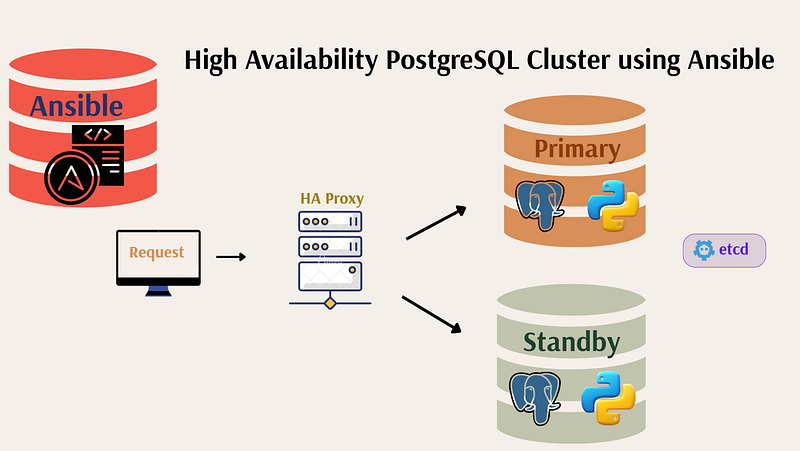
Architecture Overview
The cluster consists of:
- 1 Ansible Manager Node
- 1 Haproxy Node
- 2 PostgreSQL Nodes managed by Patroni
- 1 etcd Node
                   +-------------------+
                   | ansible-manager   |  <-- Runs Ansible playbooks
                   +-------------------+

                           |
                           v
                   +-------------------+
                   |     haproxy       |  <-- Load balancer (RW:5000, RO:5001)
                   +-------------------+
                           |
     +---------------------+----------------------+
     |                                            |
+---------+                              +---------+
|  node1  |  <-- PostgreSQL + Patroni    |  node2  |  <-- PostgreSQL + Patroni
+---------+                              +---------+

                   +---------+
                   |  etcd1  |  <-- Key-value store for Patroni
                   +---------+
Step-by-Step Setup
Create Virtual Machines with Multipass
multipass launch --name ansible-manager
multipass launch --name etcd1
multipass launch --name haproxy1
multipass launch --name node1
multipass launch --name node2
Check their IPs:
multipass list

Name                    State             IPv4             Image
ansible-manager         Running           172.26.238.104   Ubuntu 24.04 LTS
etcd1                   Running           172.26.228.41    Ubuntu 24.04 LTS
haproxy1                Running           172.26.236.90    Ubuntu 24.04 LTS
node1                   Running           172.26.226.99    Ubuntu 24.04 LTS
node2                   Running           172.26.235.51    Ubuntu 24.04 LTS
Prepare the Ansible Manager
Shell into the manager node: (Apply this per node)
multipass shell ansible-manager Create the ansible user and set a password:
sudo useradd -m -s /bin/bash ansible
sudo passwd ansible
Enable SSH password authentication:
sudo vi /etc/ssh/sshd_config.d/60-cloudimg-settings.conf
# Set: PasswordAuthentication yes


sudo systemctl restart ssh
Allow passwordless sudo for Ansible:
sudo vi /etc/sudoers.d/90-cloud-init-users
# Add: ansible ALL=(ALL) NOPASSWD:ALL
Setup SSH Keys
Login as the ansible user:
su - ansibleGenerate and copy SSH keys to all nodes:
ssh-keygen -t rsa -b 4096

ssh-copy-id ansible@172.26.228.41
# ssh-copy-id ansible@<etcd1-ip>

ssh-copy-id ansible@172.26.236.90
ssh-copy-id ansible@<haproxy1-ip>

ssh-copy-id ansible@172.26.226.99
#ssh-copy-id ansible@<node1-ip>

ssh-copy-id ansible@172.26.235.51
ssh-copy-id ansible@<node2-ip>
Clone the Ansible Playbook Repository
First, clone the repository that contains all the Ansible automation needed for this cluster setup:
git clone https://github.com/ozk17/ansible-patroni-cluster.git
cd ansible-patroni-cluster
This repository is designed to be clean and modular, making it easy to understand, modify, and reuse. It includes everything needed to bootstrap both the etcd and Patroni-based PostgreSQL cluster using Ansible.
Repository Structure
Here are the main files and templates included in the repository:
ansible-patroni-cluster/
├── inventory.ini                # Inventory file to define hosts
├── setup_etcd.yml               # Playbook to install and configure etcd
├── setup_postgres_patroni.yml   # Playbook to install PostgreSQL and Patroni
├── haproxy-setup.yml            # Playbook to install and configure HAProxy
└── templates/                   # Jinja2 templates for configuration
    ├── etcd.conf.j2             # etcd configuration template
    ├── patroni.service.j2       # systemd service file for Patroni
    ├── patroni.yml.j2           # Patroni configuration template
    └── haproxy.cfg.j2           # HAProxy config template
[etcd]
172.26.228.41

[postgres]
172.26.226.99
172.26.235.51

[haproxy]
172.26.236.90

[all:vars]
ansible_user=ansible
#ansible_ssh_private_key_file=~/.ssh/id_rsa
cat setup_etcd.yml

- name: Etcd kurulumu (Ubuntu için binary)
  hosts: etcd
  become: true
  vars:
    etcd_version: "v3.5.14"
    etcd_download_url: "https://github.com/etcd-io/etcd/releases/download/{{ etcd_version }}/etcd-{{ etcd_version }}-linux-amd64.tar.gz"
    etcd_install_dir: "/usr/local/bin"

  tasks:
    - name: Etcd paketini indir
      get_url:
        url: "{{ etcd_download_url }}"
        dest: /tmp/etcd.tar.gz

    - name: Etcd paketini aç
      unarchive:
        src: /tmp/etcd.tar.gz
        dest: /tmp
        remote_src: yes

    - name: Etcd binary'lerini kopyala ve çalıştırılabilir yap
      shell: |
        cp /tmp/etcd-{{ etcd_version }}-linux-amd64/{{ item }} {{ etcd_install_dir }}/{{ item }}
        chmod +x {{ etcd_install_dir }}/{{ item }}
      loop:
        - etcd
        - etcdctl

    - name: Etcd config dosyasını oluştur
      template:
        src: templates/etcd.conf.j2
        dest: /etc/default/etcd
        mode: '0644'

    - name: Systemd servis dosyasını oluştur
      copy:
        dest: /etc/systemd/system/etcd.service
        content: |
          [Unit]
          Description=etcd key-value store
          Documentation=https://github.com/etcd-io/etcd
          After=network.target

          [Service]
          ExecStart=/usr/local/bin/etcd
          Restart=always
          RestartSec=5
          LimitNOFILE=40000
          EnvironmentFile=-/etc/default/etcd

          [Install]
          WantedBy=multi-user.target

    - name: Systemd yeniden yükle
      systemd:
        daemon_reload: yes

    - name: Etcd servisini başlat ve etkinleştir
      systemd:
        name: etcd
        state: started
        enabled: yes
cat setup_postgres_patroni.yml

- name: PostgreSQL & Patroni kurulumu
  hosts: postgres
  become: true

  tasks:
    - name: Gerekli paketleri kur
      apt:
        name:
          - python3-venv
          - python3-pip
          - postgresql
          - postgresql-contrib
          - libpq-dev
          - build-essential
        update_cache: yes

    - name: Python venv oluştur
      command: python3 -m venv /opt/patroni-venv
      args:
        creates: /opt/patroni-venv

    - name: Patroni ve bağımlılıkları kur
      pip:
        name:
          - patroni
          - psycopg2-binary
          - python-etcd
        virtualenv: /opt/patroni-venv

    - name: Patroni config dosyasını kopyala
      template:
        src: templates/patroni.yml.j2
        dest: /etc/patroni.yml
        mode: '0644'

    - name: Patroni systemd servisini kopyala
      template:
        src: templates/patroni.service.j2
        dest: /etc/systemd/system/patroni.service
        mode: '0644'

    - name: Systemd servisini aktif et
      systemd:
        name: patroni
        daemon_reload: yes
        enabled: yes
        state: started
cat haproxy-setup.yml

---
- name: HAProxy Installation and Configuration
  hosts: haproxy
  become: true

  vars:
    haproxy_port_pg_rw: 5000
    haproxy_port_pg_ro: 5001
    haproxy_port_stats: 7000
    haproxy_bind_ip: "{{ ansible_host }}"

  tasks:
    - name: PostgreSQL node listesi başlat
      set_fact:
        postgres_nodes: []

    - name: PostgreSQL node'larını doğrudan IP'den al
      set_fact:
        postgres_nodes: "{{ postgres_nodes + [ { 'name': item, 'ip': item, 'port': 5432, 'check_port': 8008 } ] }}"
      loop: "{{ groups['postgres'] }}"

    - name: HAProxy'yi kur
      apt:
        name: haproxy
        state: present
        update_cache: yes

    - name: SELinux boolean'ı aç (varsa)
      ansible.posix.seboolean:
        name: haproxy_connect_any
        state: true
        persistent: yes
      when: ansible_facts.selinux.status is defined and ansible_facts.selinux.status == "enabled"

    - name: HAProxy konfigürasyonunu oluştur
      template:
        src: haproxy.cfg.j2
        dest: /etc/haproxy/haproxy.cfg
        owner: root
        group: root
        mode: '0644'
      notify: Restart HAProxy

    - name: HAProxy servisini başlat ve enable et
      systemd:
        name: haproxy
        state: started
        enabled: true

  handlers:
    - name: Restart HAProxy
      systemd:
        name: haproxy
        state: restarted
cat templates/etcd.conf.j2

ETCD_NAME=default
ETCD_DATA_DIR="/var/lib/etcd/default.etcd"
ETCD_LISTEN_PEER_URLS="http://{{ ansible_host }}:2380"
ETCD_LISTEN_CLIENT_URLS="http://127.0.0.1:2379,http://{{ ansible_host }}:2379"
ETCD_INITIAL_ADVERTISE_PEER_URLS="http://{{ ansible_host }}:2380"
ETCD_INITIAL_CLUSTER="default=http://{{ ansible_host }}:2380"
ETCD_INITIAL_CLUSTER_STATE="new"
ETCD_INITIAL_CLUSTER_TOKEN="etcd-cluster"
ETCD_ADVERTISE_CLIENT_URLS="http://{{ ansible_host }}:2379"
ETCD_ENABLE_V2=true
cat templates/patroni.service.j2

[Unit]
Description=Patroni - PostgreSQL HA
After=network.target

[Service]
Type=simple
User=postgres
Group=postgres
Environment="PATH=/usr/lib/postgresql/16/bin:/usr/local/sbin:/usr/local/bin:/usr/sbin:/usr/bin"
ExecStart=/opt/patroni-venv/bin/patroni /etc/patroni.yml
KillMode=process
TimeoutSec=30
Restart=on-failure

[Install]
WantedBy=multi-user.target
cat templates/patroni.yml.j2

scope: postgres
namespace: /pg_cluster/
name: {{ inventory_hostname }}

restapi:
  listen: {{ ansible_host }}:8008
  connect_address: {{ ansible_host }}:8008

etcd:
  host: {{ groups['etcd'][0] }}:2379

bootstrap:
  dcs:
    ttl: 30
    loop_wait: 10
    retry_timeout: 10
    maximum_lag_on_failover: 1048576
    postgresql:
      use_pg_rewind: true

  initdb:
  - encoding: UTF8
  - data-checksums

  pg_hba:
  - host replication repuser 127.0.0.1/32 md5
  - host replication repuser 0.0.0.0/0 md5
  - host all all 0.0.0.0/0 md5

  users:
    admin:
      password: admin
      options:
        - createrole
        - createdb

postgresql:
  listen: {{ ansible_host }}:5432
  connect_address: {{ ansible_host }}:5432
  data_dir: /var/lib/postgresql/data
  pgpass: /tmp/pgpass
  authentication:
    replication:
      username: repuser
      password: test123
    superuser:
      username: postgres
      password: test123
  parameters:
    unix_socket_directories: '.'

tags:
  nofailover: false
  noloadbalance: false
  clonefrom: false
  nosync: false
cat templates/haproxy.cfg.j2

global
    maxconn 1000
    log 127.0.0.1 local0

defaults
    log global
    mode tcp
    retries 2
    timeout client 120m
    timeout connect 4s
    timeout server 120m
    timeout check 5s

listen stats
    mode http
    bind *:{{ haproxy_port_stats }}
    stats enable
    stats uri /

frontend a_listen_fe
    acl is-read-service-dead nbsrv(standby) lt 1
    use_backend postgres if is-read-service-dead
    default_backend standby

listen postgres
    bind {{ haproxy_bind_ip }}:{{ haproxy_port_pg_rw }}
    option httpchk OPTIONS/master
    http-check expect status 200
    default-server inter 3s fall 4 rise 3 on-marked-down shutdown-sessions
    {% for node in postgres_nodes %}
    server {{ node.name }} {{ node.ip }}:{{ node.port }} maxconn 1000 check port {{ node.check_port }}
    {% endfor %}

listen standby
    bind {{ haproxy_bind_ip }}:{{ haproxy_port_pg_ro }}
    option httpchk OPTIONS/replica
    http-check expect status 200
    default-server inter 3s fall 4 rise 3 on-marked-down shutdown-sessions
    {% for node in postgres_nodes %}
    server {{ node.name }} {{ node.ip }}:{{ node.port }} maxconn 1000 check port {{ node.check_port }}
    {% endfor %}
Each file has a specific role and is designed to be easily customizable for your own cluster needs. I’ll walk you through the content and purpose of each of these files in the next sections.
Install Ansible
sudo apt update
sudo apt install software-properties-common
sudo add-apt-repository --yes --update ppa:ansible/ansible
sudo apt install ansible
Run the Playbooks
Edit your inventory.ini:
[etcd]
172.26.228.41

[postgresql]
172.26.226.99
172.26.235.51
Run etcd setup:
ansible-playbook -i inventory.ini setup_etcd.ymlCheck etcd status:
root@etcd1:~# etcdctl --endpoints=172.26.228.41:2379 endpoint status --write-out=table
+--------------------+------------------+---------+---------+-----------+------------+-----------+------------+--------------------+--------+
|      ENDPOINT      |        ID        | VERSION | DB SIZE | IS LEADER | IS LEARNER | RAFT TERM | RAFT INDEX | RAFT APPLIED INDEX | ERRORS |
+--------------------+------------------+---------+---------+-----------+------------+-----------+------------+--------------------+--------+
| 172.26.228.41:2379 | 9f4ab1e673198e09 |  3.5.14 |   20 kB |      true |      false |         2 |          4 |                  4 |        |
+--------------------+------------------+---------+---------+-----------+------------+-----------+------------+--------------------+--------+
root@etcd1:~#
Run Patroni + PostgreSQL setup:
ansible-playbook -i inventory.ini setup_postgres_patroni.ymlVerify the Cluster
SSH into node1 or node2 and run:
/opt/patroni-venv/bin/patronictl -c /etc/patroni.yml listSample output:
+ Cluster: postgres (7525717775729802398) +-----------+----+-----------+
| Member        | Host          | Role    | State     | TL | Lag in MB |
+---------------+---------------+---------+-----------+----+-----------+
| 172.26.226.99 | 172.26.226.99 | Leader  | running   |  1 |           |
| 172.26.235.51 | 172.26.235.51 | Replica | streaming |  1 |         0 |
+---------------+---------------+---------+-----------+----+-----------+
Run Haproxy setup:
ansible-playbook -i inventory.ini haproxy-setup.ymlCheck Load balance
psql -h 172.26.236.90 -p 5001 -d postgres -U postgres
postgres kullanıcısının parolası:
postgres=# \q

psql -h 172.26.236.90 -p 5000 -d postgres -U postgres
postgres kullanıcısının parolası:
postgres=#
Conclusion
Setting up a high availability PostgreSQL cluster may seem complex at first, but with the right tools, it becomes manageable even enjoyable.
In this tutorial, you’ve seen how:
- Multipass simplifies local VM provisioning.
- Ansible automates every step — from installing packages to configuring services.
- Patroni and etcd work together to provide PostgreSQL with automatic failover and replication.
- Jinja2 templates keep configuration clean, flexible, and environment-agnostic.
This approach gives you a fully functional, production-like HA PostgreSQL environment on your local machine. It’s perfect for learning, testing, and even building the foundation of future deployments.