 ← PostgreSQL Blog
Patroni Cluster with Ansible
Patroni Cluster with Ansible
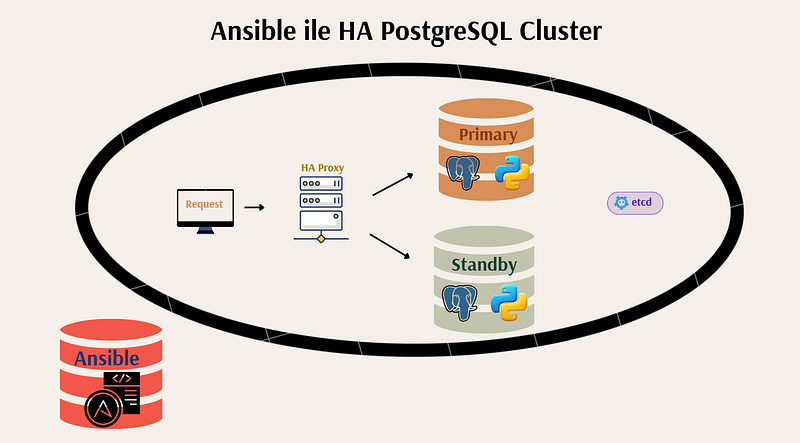
In this guide, I’ll walk you through the process of building a PostgreSQL high availability cluster using real servers (or virtual machines) running Rocky Linux 9, and orchestrating the whole process using Ansible, Patroni, Etcd, and HAProxy. If you’re a database engineer, DevOps professional, or backend developer looking to understand the architecture and hands-on setup of HA PostgreSQL clusters, this guide is for you.
What You’ll Learn
- Using Ansible playbooks to configure all services
- Installing and configuring Etcd as a distributed key-value store
- Setting up PostgreSQL with Patroni for automatic failover and replication
- Using HAProxy for read/write routing and connection load balancing
Architecture Overview
Here’s the architecture of the cluster we’re going to build:
+---------------------+
| ansible-manager     |  <-- Runs Ansible playbooks
+---------------------+

|
          v
+---------------------+
|     haproxy         |  <-- Load balancer (RW:5000, RO:5001)
+---------------------+
          |
+---------+---------+
|                   |
v                   v
+---------+   +---------+
| node1   |   | node2   |  <-- PostgreSQL + Patroni
+---------+   +---------+
        |
        v
+---------+
|  etcd1  |  <-- Etcd quorum store
+---------+
1. Initial Server Setup
Hostname and Static IP Configuration
Make sure each Rocky Linux 9 server has a static IP and a proper hostname. Update /etc/hosts accordingly:
192.168.122.10  ansible-manager
192.168.122.11  etcd1
192.168.122.12  haproxy1
192.168.122.13  node1
192.168.122.14  node2
2. Create the Ansible User
On all nodes:
useradd -m -s /bin/bash ansible
passwd ansible
Enable passwordless sudo access:
echo "ansible ALL=(ALL) NOPASSWD:ALL" > /etc/sudoers.d/ansible3. SSH Key Authentication
On the Ansible manager node, log in as the ansible user:
su - ansible
ssh-keygen -t rsa -b 4096
Copy the public key to each target host:
ssh-copy-id ansible@etcd1
ssh-copy-id ansible@haproxy1
ssh-copy-id ansible@node1
ssh-copy-id ansible@node2
4. Clone the Ansible Repository
From the Ansible manager:
git clone  https://github.com/ozk17/AnsibleHACluster.git
cd AnsibleHACluster
5. Repository Structure
ansible-patroni-cluster/
├── inventory.ini               # Hosts and groups
├── setup_etcd.yml              # Playbook for Etcd
├── setup_postgres_patroni.yml  # Playbook for Patroni and PostgreSQL
├── haproxy-setup.yml           # Playbook for HAProxy
└── templates/
    ├── etcd.conf.j2
    ├── patroni.service.j2
    ├── patroni.yml.j2
    └── haproxy.cfg.j2
Here are the main files and templates included in the repository:
ansible-patroni-cluster/
├── inventory.ini                # Inventory file to define hosts
├── setup_etcd.yml               # Playbook to install and configure etcd
├── setup_postgres_patroni.yml   # Playbook to install PostgreSQL and Patroni
├── haproxy-setup.yml            # Playbook to install and configure HAProxy
└── templates/                   # Jinja2 templates for configuration
    ├── etcd.conf.j2             # etcd configuration template
    ├── patroni.service.j2       # systemd service file for Patroni
    ├── patroni.yml.j2           # Patroni configuration template
    └── haproxy.cfg.j2           # HAProxy config template
[etcd]
***.***.***.***
[postgres]
***.***.***.***
***.***.***.***

[haproxy]
***.***.***.***

[all:vars]
ansible_user=ansible
#ansible_ssh_private_key_file=~/.ssh/id_rsa
cat setup_etcd.yml

- name: Etcd kurulumu (Rocky Linux 9 Minimal)
  hosts: etcd
  become: true

  vars:
    etcd_version: "v3.5.14"
    etcd_download_url: "https://github.com/etcd-io/etcd/releases/download/{{ etcd_version }}/etcd-{{ etcd_version }}-linux-amd64.tar.gz"
    etcd_install_dir: "/usr/local/bin"

  tasks:
    - name: Gerekli yardımcı paketleri kur
      yum:
        name:
          - tar
          - wget
          - curl
        state: present

    - name: etcd binary'yi indir
      get_url:
        url: "{{ etcd_download_url }}"
        dest: /tmp/etcd.tar.gz

    - name: etcd arşivini aç
      unarchive:
        src: /tmp/etcd.tar.gz
        dest: /tmp
        remote_src: yes

    - name: etcd ve etcdctl binary'lerini kopyala ve çalıştırılabilir yap
      copy:
        src: "/tmp/etcd-{{ etcd_version }}-linux-amd64/{{ item }}"
        dest: "{{ etcd_install_dir }}/{{ item }}"
        mode: '0755'
        remote_src: yes
      loop:
        - etcd
        - etcdctl

    - name: etcd config dosyasını oluştur
      template:
        src: templates/etcd.conf.j2
        dest: /etc/default/etcd
        mode: '0644'

    - name: etcd systemd servis dosyasını oluştur
      copy:
        dest: /etc/systemd/system/etcd.service
        content: |
          [Unit]
          Description=etcd key-value store
          Documentation=https://github.com/etcd-io/etcd
          After=network.target

          [Service]
          ExecStart=/usr/local/bin/etcd
          Restart=always
          RestartSec=5
          LimitNOFILE=40000
          EnvironmentFile=-/etc/default/etcd

          [Install]
          WantedBy=multi-user.target

    - name: systemd daemon'ı yeniden yükle
      systemd:
        daemon_reload: yes

    - name: etcd servisini başlat ve etkinleştir
      systemd:
        name: etcd
        state: started
        enabled: yes
cat setup_postgres_patroni.yml

- name: PostgreSQL & Patroni kurulumu (Rocky Linux 9 Minimal)
  hosts: postgres
  become: true

  vars:
    pg_version: "16"
    pg_bin_path: "/usr/pgsql-16/bin"

  tasks:
    - name: Gerekli sistem paketlerini kur
      yum:
        name:
          - epel-release
          - gcc
          - python3
          - python3-pip
          - python3-devel
          - libpq-devel
          - sudo
          - curl
        state: present

    - name: PostgreSQL PGDG .rpm dosyasını indir
      get_url:
        url: "https://download.postgresql.org/pub/repos/yum/reporpms/EL-9-x86_64/pgdg-redhat-repo-latest.noarch.rpm"
        dest: /tmp/pgdg-redhat-repo-latest.noarch.rpm

    - name: PGDG .rpm dosyasını yum ile kur
      command: dnf install -y --nogpgcheck /tmp/pgdg-redhat-repo-latest.noarch.rpm

    - name: AppStream üzerinden gelen eski PostgreSQL'i devre dışı bırak
      shell: dnf -qy module disable postgresql

    - name: PostgreSQL paketlerini kur (PGDG'den)
      yum:
        name:
          - postgresql{{ pg_version }}
          - postgresql{{ pg_version }}-server
          - postgresql{{ pg_version }}-contrib
        state: present

    - name: Python virtualenv oluştur
      command: python3 -m venv /opt/patroni-venv
      args:
        creates: /opt/patroni-venv

    - name: Patroni ve bağımlılıkları kur
      pip:
        virtualenv: /opt/patroni-venv
        name:
          - patroni
          - psycopg2-binary
          - python-etcd

    - name: Patroni config dosyasını oluştur
      template:
        src: templates/patroni.yml.j2
        dest: /etc/patroni.yml
        mode: '0644'

    - name: Patroni systemd servis dosyasını kopyala
      template:
        src: templates/patroni.service.j2
        dest: /etc/systemd/system/patroni.service
        mode: '0644'

    - name: systemd servisini reload et ve Patroni'yi başlat
      systemd:
        name: patroni
        daemon_reload: yes
        enabled: yes
        state: started
cat haproxy-setup.yml

---
- name: HAProxy Installation and Configuration
  hosts: haproxy
  become: true

  vars:
    haproxy_port_pg_rw: 5000
    haproxy_port_pg_ro: 5001
    haproxy_port_stats: 7000
    #haproxy_bind_ip: "{{ ansible_default_ipv4.address }}"
    haproxy_bind_ip: "{{ ansible_host }}"


  tasks:
    - name: PostgreSQL node listesi başlat
      set_fact:
        postgres_nodes: []

    - name: PostgreSQL node'larını IP ile listele ve isim ata (pg1, pg2 ...)
      set_fact:
        postgres_nodes: "{{ postgres_nodes + [ { 'name': 'pg' + (index + 1) | string, 'ip': item, 'port': 5432, 'check_port': 8008 } ] }}"
      loop: "{{ groups['postgres'] }}"
      loop_control:
        index_var: index

    - name: HAProxy'yi kur
      dnf:
        name: haproxy
        state: present
        update_cache: yes

    - name: HAProxy konfigürasyonunu oluştur
      template:
        src: haproxy.cfg.j2
        dest: /etc/haproxy/haproxy.cfg
        owner: root
        group: root
        mode: '0644'
      notify: Restart HAProxy

    - name: python3-libsemanage paketini kur
      dnf:
        name: python3-libsemanage
        state: present
      become: true

    - name: SELinux boolean'ı aç (haproxy_connect_any)
      ansible.posix.seboolean:
        name: haproxy_connect_any
        state: true
        persistent: yes
      become: true
      when: ansible_facts.selinux.status is defined and ansible_facts.selinux.status == "enabled"


    - name: HAProxy servisini başlat ve enable et
      systemd:
        name: haproxy
        state: started
        enabled: true

  handlers:
    - name: Restart HAProxy
      systemd:
        name: haproxy
        state: restarted
cat templates/etcd.conf.j2

ETCD_NAME=default
ETCD_DATA_DIR="/var/lib/etcd/default.etcd"
ETCD_LISTEN_PEER_URLS="http://{{ ansible_host }}:2380"
ETCD_LISTEN_CLIENT_URLS="http://127.0.0.1:2379,http://{{ ansible_host }}:2379"
ETCD_INITIAL_ADVERTISE_PEER_URLS="http://{{ ansible_host }}:2380"
ETCD_INITIAL_CLUSTER="default=http://{{ ansible_host }}:2380"
ETCD_INITIAL_CLUSTER_STATE="new"
ETCD_INITIAL_CLUSTER_TOKEN="etcd-cluster"
ETCD_ADVERTISE_CLIENT_URLS="http://{{ ansible_host }}:2379"
ETCD_ENABLE_V2=true
cat templates/patroni.service.j2

[Unit]
Description=Patroni - PostgreSQL HA
After=network.target

[Service]
Type=simple
User=postgres
Group=postgres
Environment="PATH=/usr/pgsql-16/bin:/usr/local/sbin:/usr/local/bin:/usr/sbin:/usr/bin"
ExecStart=/opt/patroni-venv/bin/patroni /etc/patroni.yml
KillMode=process
TimeoutSec=30
Restart=on-failure

[Install]
WantedBy=multi-user.target
cat templates/patroni.yml.j2

scope: postgres
namespace: /pg_cluster/
name: {{ inventory_hostname }}

restapi:
  listen: {{ ansible_host }}:8008
  connect_address: {{ ansible_host }}:8008

etcd:
  host: {{ groups['etcd'][0] }}:2379

bootstrap:
  dcs:
    ttl: 30
    loop_wait: 10
    retry_timeout: 10
    maximum_lag_on_failover: 1048576
    postgresql:
      use_pg_rewind: true

  initdb:
  - encoding: UTF8
  - data-checksums

  pg_hba:
  - host replication repuser 127.0.0.1/32 md5
  - host replication repuser 0.0.0.0/0 md5
  - host all all 0.0.0.0/0 md5

  users:
    admin:
      password: admin
      options:
        - createrole
        - createdb

postgresql:
  listen: {{ ansible_host }}:5432
  connect_address: {{ ansible_host }}:5432
  data_dir: /var/lib/pgsql/16/data
  pgpass: /var/lib/pgsql/.pgpass
  authentication:
    replication:
      username: repuser
      password: test123
    superuser:
      username: postgres
      password: test123
  parameters:
    unix_socket_directories: '.'

tags:
  nofailover: false
  noloadbalance: false
  clonefrom: false
  nosync: false
cat templates/haproxy.cfg.j2

global
    maxconn 1000
    log 127.0.0.1 local0

defaults
    log global
    mode tcp
    retries 2
    timeout client 120m
    timeout connect 4s
    timeout server 120m
    timeout check 5s

listen stats
    mode http
    bind *:{{ haproxy_port_stats }}
    stats enable
    stats uri /

frontend a_listen_fe
    acl is-read-service-dead nbsrv(standby) lt 1
    use_backend postgres if is-read-service-dead
    default_backend standby

listen postgres
    bind {{ haproxy_bind_ip }}:{{ haproxy_port_pg_rw }}
    option httpchk OPTIONS/master
    http-check expect status 200
    default-server inter 3s fall 4 rise 3 on-marked-down shutdown-sessions
    {% for node in postgres_nodes %}
    server {{ node.name }} {{ node.ip }}:{{ node.port }} maxconn 1000 check port {{ node.check_port }}
    {% endfor %}

listen standby
    bind {{ haproxy_bind_ip }}:{{ haproxy_port_pg_ro }}
    option httpchk OPTIONS/replica
    http-check expect status 200
    default-server inter 3s fall 4 rise 3 on-marked-down shutdown-sessions
    {% for node in postgres_nodes %}
    server {{ node.name }} {{ node.ip }}:{{ node.port }} maxconn 1000 check port {{ node.check_port }}
    {% endfor %}
6. Install Ansible
sudo dnf install epel-release
sudo dnf install ansible
Run the Playbooks
Edit your inventory.ini:
[etcd]
172.26.228.41
[etcd]
***.***.***.***
[postgres]
***.***.***.***
***.***.***.***

[haproxy]
***.***.***.***

[all:vars]
ansible_user=ansible
#ansible_ssh_private_key_file=~/.ssh/id_rsa
Run etcd setup:
ansible-playbook -i inventory.ini setup_etcd.ymlCheck etcd status:
root@etcd1:~# etcdctl --endpoints=172.26.228.41:2379 endpoint status --write-out=table
+--------------------+------------------+---------+---------+-----------+------------+-----------+------------+--------------------+--------+
|      ENDPOINT      |        ID        | VERSION | DB SIZE | IS LEADER | IS LEARNER | RAFT TERM | RAFT INDEX | RAFT APPLIED INDEX | ERRORS |
+--------------------+------------------+---------+---------+-----------+------------+-----------+------------+--------------------+--------+
| 172.26.228.41:2379 | 9f4ab1e673198e09 |  3.5.14 |   20 kB |      true |      false |         2 |          4 |                  4 |        |
+--------------------+------------------+---------+---------+-----------+------------+-----------+------------+--------------------+--------+
root@etcd1:~#
Run Patroni + PostgreSQL setup:
ansible-playbook -i inventory.ini setup_postgres_patroni.ymlVerify the Cluster
SSH into node1 or node2 and run:
/opt/patroni-venv/bin/patronictl -c /etc/patroni.yml listSample output:
+ Cluster: postgres (7525717775729802398) +-----------+----+-----------+
| Member        | Host          | Role    | State     | TL | Lag in MB |
+---------------+---------------+---------+-----------+----+-----------+
| 172.26.226.99 | 172.26.226.99 | Leader  | running   |  1 |           |
| 172.26.235.51 | 172.26.235.51 | Replica | streaming |  1 |         0 |
+---------------+---------------+---------+-----------+----+-----------+
Run Haproxy setup:
ansible-playbook -i inventory.ini haproxy-setup.ymlCheck Load balance
psql -h 172.26.236.90 -p 5001 -d postgres -U postgres
postgres kullanıcısının parolası:
postgres=# \q


psql -h 172.26.236.90 -p 5000 -d postgres -U postgres
postgres kullanıcısının parolası:
postgres=#
Conclusion
Setting up a high availability PostgreSQL cluster may seem complex at first, but with the right tools, it becomes manageable even enjoyable.
In this tutorial, you’ve seen how:
- Ansible automates every step from installing packages to configuring services.
- Patroni and etcd work together to provide PostgreSQL with automatic failover and replication.
- Jinja2 templates keep configuration clean, flexible, and environment-agnostic.
- HAProxy acts as a smart traffic router, seamlessly directing client connections to the appropriate PostgreSQL node based on availability and role (primary/replica).
This approach gives you a fully functional, production-like HA PostgreSQL environment. It’s perfect for learning, testing, and even building the foundation of future deployments.