 ← PostgreSQL Blog
Accessing Microsoft SQL Server Data from PostgreSQL Using tds_fdw
Accessing Microsoft SQL Server Data from PostgreSQL Using tds_fdw
In this guide, we’ll demonstrate how to connect PostgreSQL to a Microsoft SQL Server instance using the TDS Foreign Data Wrapper (tds_fdw), and how to import MSSQL tables into PostgreSQL to enable cross-database querying.
This method is useful when you want to:
- Join MSSQL and PostgreSQL data in a single query.
- Access read-only data from a legacy system.
- Migrate table structures gradually.

Requirements
Make sure you have the following components installed on your PostgreSQL server:
- PostgreSQL 13 or higher
tds_fdw(version must match your PostgreSQL version)FreeTDSlibraries (required bytds_fdw)- Network access to the MSSQL server
Install tds_fdw
On RHEL/CentOS/Rocky Linux:
sudo dnf install -y tds_fdw_17This will also install FreeTDS libraries required for communication with MSSQL.
Test the MSSQL Connection (Optional)
Before configuring PostgreSQL, verify MSSQL connectivity using tsql:
tsql -H SQLSERVER -p 1907 -U ******** -P '********'Inside tsql, you can try:
SELECT name FROM sys.databases
GO

USE UserDB;
GO

SELECT TABLE_SCHEMA, TABLE_NAME FROM INFORMATION_SCHEMA.TABLES WHERE TABLE_TYPE = 'BASE TABLE';
GO
If successful, proceed to PostgreSQL steps.
Enable Extension in PostgreSQL
Connect to your PostgreSQL database and run:
CREATE EXTENSION IF NOT EXISTS tds_fdw;Create MSSQL Foreign Server
Define the MSSQL server and connection parameters:
CREATE SERVER mssql_server
FOREIGN DATA WRAPPER tds_fdw
OPTIONS (
    servername 'SQLSERVER',
    port '1907',
    database 'UserDB'
);
Create User Mapping
Map a PostgreSQL user to the MSSQL user:
CREATE USER MAPPING FOR CURRENT_USER
SERVER mssql_server
OPTIONS (
    username '*******************',
    password '*******************'
);
Import Specific Table (Manual Mapping)
You can define a specific table manually as a foreign table:
CREATE FOREIGN TABLE IF NOT EXISTS public."Users" (
    "Id" integer OPTIONS (column_name 'Id') NOT NULL,
    "UserName" text OPTIONS (column_name 'UserName') COLLATE pg_catalog."default",
    "Role" integer OPTIONS (column_name 'Role')
)
SERVER mssql_server
OPTIONS (
    schema_name 'dbo',
    table_name 'Users'
);
Import All Tables Automatically (Optional)
If you want to import all tables from a specific schema (dbo) at once:
IMPORT FOREIGN SCHEMA dbo
FROM SERVER mssql_server
INTO public;
This will create foreign table definitions for each MSSQL table inside the public schema in PostgreSQL.Query MSSQL Data from PostgreSQL
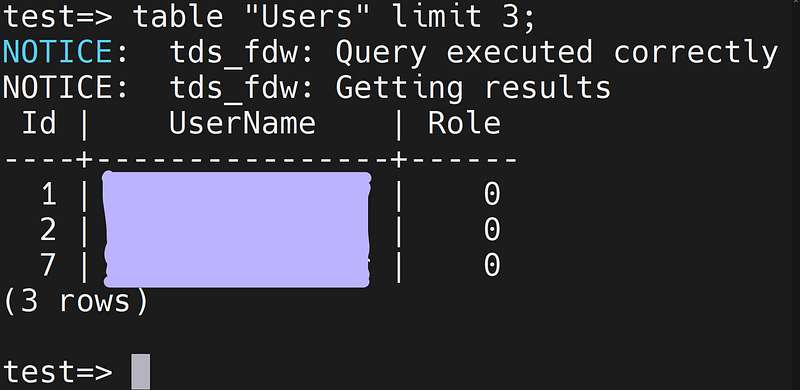
Once the foreign table is defined, query it like any regular table:
table "Users" LIMIT 3;Output:
Notes and Considerations
- Foreign tables are read-only unless configured with writable capabilities.
- If the MSSQL column is
nvarchar(max), theCHARACTER_MAXIMUM_LENGTHmay appear as-1. PostgreSQL will map this astext. - For performance, indexes are not pushed down to MSSQL — only filters and projections may be optimized depending on FDW version.
- For large-scale migrations, consider dumping and transforming the data with ETL tools (e.g.,
pgloader,Pentaho,Talend).
Troubleshooting
DB-Library error / General SQL Server error
- Check IP/hostname and port (MSSQL may use non-standard ports).
- Make sure the
FreeTDSversion supports SSL/TLS if your server requires encryption. - Check firewall rules between PostgreSQL and MSSQL.
Collation Error
If you face errors related to collation differences, explicitly set collations on text fields or cast them as needed in queries.
Summary
You now have a functional bridge between PostgreSQL and Microsoft SQL Server using tds_fdw. This allows seamless querying of external MSSQL data directly within PostgreSQL, enabling hybrid analytics and gradual data migration strategies.