 ← PostgreSQL Blog
Linux Swappiness and PostgreSQL Performance Optimization
Linux Swappiness and PostgreSQL Performance Optimization
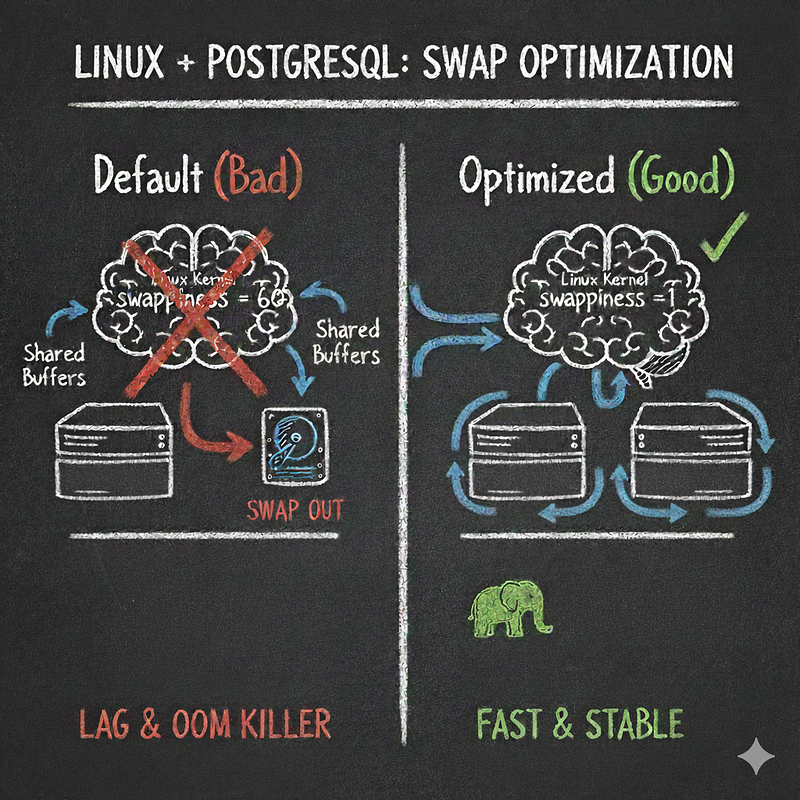
Introduction: Why Your High-RAM Database Server Still Crashes Under Load
Every Database Engineer dreads the moment a heavily loaded PostgreSQL server suddenly slows to a crawl, becoming unresponsive for minutes a condition technically known as “Thrashing.” While often blamed on pure RAM exhaustion, the true culprit is frequently a default setting within the Linux kernel itself: Swap Space Management.
For memory-intensive systems like PostgreSQL, the default Linux memory policy can hijack critical database performance. The kernel may aggressively page out (swap) essential data blocks that PostgreSQL needs immediately, forcing a costly disk read operation when the data is requested again.
In this comprehensive guide, we will delve into the Linux memory subsystem, diagnose the root cause of “Swap Thrashing,” and provide granular, step-by-step instructions to train the Linux kernel to perfectly align with the high-performance demands of your PostgreSQL instance.
What Awaits You in This Content? (The Critical Takeaways)
- Solving the Performance Paradox: Understand why your server, despite having ample physical RAM, aggressively uses the slow swap disk, and learn how to completely mitigate the risk of the dreaded OOM (Out of Memory) Killer event.
- The Swappiness Sweet Spot: We will deconstruct the
/proc/sys/vm/swappinessparameter and guide you to set the optimal value for database servers (Hint: The default of60is almost always wrong!), ensuring persistent configuration across reboots. - A Deep Dive into Linux Page Cache: Learn the crucial difference between the Linux Page Cache and PostgreSQL’s internal buffers, and how to configure key kernel parameters like
vm.dirty_ratioto reduce I/O spikes. - Bridging the Gap: We will detail the necessary synergy between your Linux kernel configuration and PostgreSQL’s primary memory parameters, such as
shared_buffersandeffective_cache_size, to achieve peak query planner efficiency. - Live Diagnostics: Master the use of monitoring tools like
vmstatto instantly diagnose and confirm the successful elimination of Swap In (si) and Swap Out (so) activity under heavy load.
Section 1: Decoding Linux Memory and PostgreSQL’s Demands
To optimize performance, we must first understand the fundamental tension between the operating system’s general-purpose memory management and a specialized application like PostgreSQL.
1.1. The Role of Swap and the Danger of Paging
Swap is designed to free up physical RAM by moving memory pages that haven’t been accessed recently to a dedicated disk partition. This is helpful for systems running many applications intermittently.
However, PostgreSQL maintains its own critical data structures (like shared_buffers) which are accessed randomly and frequently. If the Linux kernel decides to swap out a page belonging to an index or table that PostgreSQL needs immediately, the database must wait for a disk I/O operation to retrieve it. This latency introduces massive spikes in query execution time.
Key Term: Thrashing occurs when the system spends more time moving data between RAM and swap (paging) than it does executing actual application instructions. This is the primary cause of sudden, catastrophic performance drops in database environments.
1.2. The Aggression Level: The swappiness Parameter
The swappiness kernel parameter controls the relative weight the kernel gives to swapping out application memory versus dropping file system cache.
Swappiness Value (0–100) Kernel BehaviorImpact on PostgreSQL Server 0 Swapping is avoided entirely. Only swap if RAM is critically low (OOM territory). High risk of OOM Killer if RAM is over-provisioned.1–10 Recommended for DBs. Swapping is highly discouraged. Prioritizes keeping application (PostgreSQL) memory in RAM.Minimal Thrashing, high stability.60 (Default) Swap aggressively when RAM usage hits ~40% Disaster. Aggressively pages out critical PostgreSQL buffers, causing Thrashing. 100Swap happens even with a lot of free RAM; highly favors keeping the file cache.Unacceptable for any dedicated database server.
For dedicated PostgreSQL servers, a low value (1 or 10) is essential to instruct the kernel to keep the application's memory pages in physical RAM as long as possible.
Section 2: Step-by-Step Optimization: Kernel Tuning
We will make the changes persistent using the sysctl utility and configuration file.
2.1. Checking and Temporarily Setting Swappiness
First, check the current value:
cat /proc/sys/vm/swappiness
# Expect to see 60 on most default Linux installations.
To temporarily set the value to the recommended minimum (1):
sudo sysctl vm.swappiness=12.2. Making Changes Permanent: /etc/sysctl.conf
To ensure your server retains the setting after a reboot, edit the system configuration file:
sudo vi /etc/sysctl.confAppend the following critical line:
# --- PostgreSQL/Database Server Optimization ---
# 1: Strongly discourage swapping of application memory.
vm.swappiness = 1

# Reduce write I/O spikes (Dirty Pages management)
# 10% of memory can be 'dirty' before background writeback starts
vm.dirty_background_ratio = 10
# 20% of memory can be 'dirty' before foreground writeback starts (blocking I/O)
vm.dirty_ratio = 20
Apply the new settings without rebooting:
sudo sysctl -p2.3. Synergistic PostgreSQL Configuration
The kernel is now optimized. You must also ensure PostgreSQL’s own memory settings are sensible, especially in light of the reduced swapping:
shared_buffers: This is PostgreSQL's primary cache. Set this between 25% and 40% of total system RAM. Too low hinders performance; too high can starve the OS.effective_cache_size: This parameter guides the query planner by telling it how much memory it can expect to be available for disk caching, including the OS Page Cache. Set this typically between 50% and 75% of total system RAM. (This parameter does not allocate memory, it just informs the planner.)
Section 3: Diagnosis and Validation: Confirming Success
The final step is to prove that the Thrashing has stopped by monitoring the virtual memory statistics under a typical or peak workload.
3.1. Monitoring Swap Activity with vmstat
The vmstat tool provides real-time virtual memory reports. Pay attention to the si (swap in) and so (swap out) columns.
Run the tool every 5 seconds:
vmstat 5ColumnDescriptionExpected Value During ThrashingExpected Value After OptimizationsiSwapped IN from disk to RAM (KB/s)High ( > 0)Zero (0)soSwapped OUT from RAM to disk (KB/s)High ( > 0)Zero (0)
If you observe sustained zero (0) values for both si and so columns during periods of high database activity, your optimization has been successful. Your PostgreSQL server is now running optimally within physical RAM, eliminating disk-based performance bottlenecks caused by aggressive swapping.
3.2. Conclusion: The Foundation of Database Reliability
Optimizing the Linux vm.swappiness parameter is a foundational, yet frequently overlooked, step in configuring a reliable and high-performing PostgreSQL environment. By controlling the kernel's memory management, you ensure that vital database buffers stay resident in RAM, leading to faster query execution, increased stability, and the prevention of catastrophic performance failures.