 ← PostgreSQL Blog
Is the PostgreSQL DELETE Command Lying to You?
Is the PostgreSQL DELETE Command Lying to You?
What actually happens when you run a DELETE FROM table WHERE id = 1907; command in a SQL query?

Most software developers assume that the data is physically deleted from the disk immediately, free space is reclaimed, and the file size shrinks. Just like deleting a file from the “Recycle Bin” in Windows, right?
However, in the world of PostgreSQL, the reality is quite different.
When you delete data in PostgreSQL, that data doesn’t disappear immediately. It simply becomes “invisible.” These pieces of data, which continue to live deep within the 8KB pages on the disk, are technically called “Dead Tuples,” or as I like to call them, “Ghost Data.”
In this article, we will pop the hood of PostgreSQL, use the pageinspect tool to look at the physical blocks of the disk, and prove that the data you thought you deleted is actually still sitting there.
If you are ready, let’s descend into the data graveyard.
MVCC: Why Are Traces of the Past Kept?
PostgreSQL uses a mechanism called MVCC (Multi-Version Concurrency Control), one of the most reliable architectures in the database world.
Imagine hundreds of users performing operations on your database simultaneously. While one is generating a report, another is updating an order status. If a row were destroyed the moment it was updated, the person generating the report would see inconsistent data.
Thanks to MVCC, PostgreSQL ensures that readers don’t block writers, and writers don’t block readers. To achieve this, it keeps older versions of the data.
Every data row (tuple) has a hidden header that we don’t see in standard SELECT * queries. There are two critical fields in this header:
t_xmin(Date of Birth): The ID of the transaction that created this row.t_xmax(Date of Death): The ID of the transaction that deleted or updated this row.
When a row is first inserted, the t_xmax value is 0. This means the row is alive and visible to everyone.
Experiment Time: Seeing the Ghost with Our Own Eyes
Let’s put the theory aside, put on our surgical gloves, and use the pageinspect extension that comes with PostgreSQL.
First, let’s enable the extension and create a simple table:
CREATE EXTENSION IF NOT EXISTS pageinspect;

CREATE TABLE ghost_demo (
    id int,
    data text
);


INSERT INTO ghost_demo VALUES (1, 'I Am Here!');
Right now, our data is alive. But what is the situation in the raw data on the disk? Let’s read the physical block of the disk using the get_raw_page function:
SELECT lp, t_xmin, t_xmax, t_data
FROM heap_page_items(get_raw_page('ghost_demo', 0));
Output (Example):

As you can see, the t_xmax value is 0. This row is currently alive and healthy.
Now, Let’s Become a Killer: The DELETE Command
We delete the same row:
DELETE FROM ghost_demo WHERE id = 1;You received the “DELETE 1” message from the console. When you run SELECT * FROM ghost_demo;, the table comes back empty. The data is gone, right?
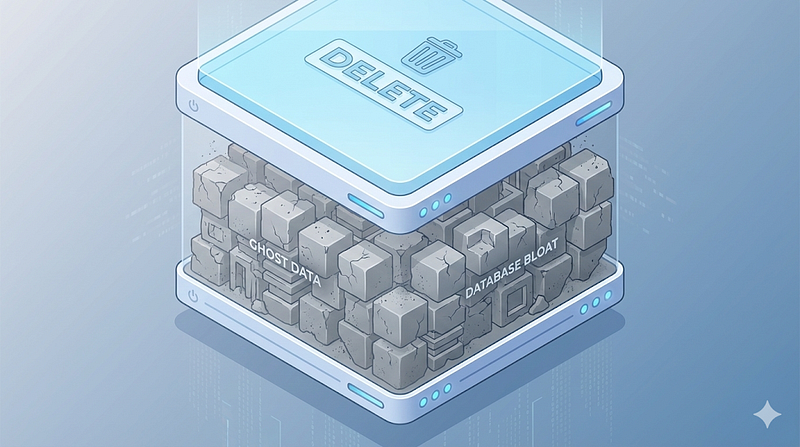
No. Let’s look at the disk again:
SELECT lp, t_xmin, t_xmax, t_data
FROM heap_page_items(get_raw_page('ghost_demo', 0));
Output (Example):
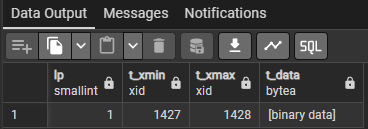
Attention! The text “I Am Here!” is still standing there in the data (t_data) column! Nothing has been deleted from the disk.
The only thing that changed is that the t_xmax field has been updated from 0 to 1428 (the ID of the deleting transaction).
From this moment on, PostgreSQL tells incoming queries: “Look, this row’s t_xmax value is filled. So, this row is dead. Even if the data physically sits there, do not show it to the user."
The Problem: Database Bloat
Why is this a problem? Disk space might be cheap, but performance is not.
In PostgreSQL, an UPDATE operation is technically a DELETE followed by an INSERT.
- The old row is marked as “dead” (
t_xmaxfilled). - A “new” row is added with the new data (
t_xmax0).
If these dead tuples are not cleaned up, as you constantly update data in your table, the number of pages on the disk increases, but the amount of “live” data remains the same. Your table turns into Swiss cheese, full of holes. In the literature, this is called Table Bloat.
What is the Cost of Bloat?
- Wasted Disk Space: Your 1 GB of data might occupy 10 GB on the disk.
- Increased I/O (Slowness): PostgreSQL has to scan over thousands of “dead” rows to find the 10 “live” rows. Your queries get slower.
The Solution: Ghostbusters (Vacuum and Fillfactor)
There are ways to get rid of these ghosts and keep the database in shape.
1. VACUUM
This is PostgreSQL’s janitor. The standard VACUUM process does not delete the space occupied by dead rows from the disk, but marks these areas as "reusable." So, when new data is added, PostgreSQL uses these emptied spots instead of going to the end of the disk.
Note: The VACUUM FULL command rewrites the entire table and shrinks its physical size. However, it locks the table during the process. It must be used with extreme caution on live systems (Use pg_repack for minumum downtime).2. Fillfactor Setting
If your table receives a lot of updates, changing the Fillfactor setting can be a lifesaver.
By default, PostgreSQL tries to fill pages to 100%. But remember, an UPDATE operation means adding a new row. If the page is 100% full, the new version won't fit in that page and is written to a different page. This means extra I/O.
If you set the Fillfactor to 90%, PostgreSQL leaves 10% free space in every page. Thus, when a row is updated, the new version can be written to this empty space in the same page (this is called a HOT Update — Heap Only Tuple). This prevents index updates and significantly increases performance.
-- Setting the table's fillfactor to 90%
ALTER TABLE ghost_demo SET (fillfactor = 90);
Conclusion
In PostgreSQL, “deleting” is not destroying data; it is sticking an “unusable” label on it.
As a Database Administrator or Backend Developer:
- Ensure your Autovacuum processes are running correctly.
- Review the
Fillfactorsetting on your frequently updated critical tables. - If your disk size is growing senselessly, remember that “ghosts” (bloat) might be the culprit.
Remember: Nothing truly disappears in the database, it just becomes invisible.
Sources Used:
- PostgreSQL Documentation: Page Layout & PageHeaderData
- PostgreSQL Wiki: VACUUM & Bloat