 ← PostgreSQL Blog
PostgreSQL Backup Strategies
PostgreSQL Backup Strategies
Database engineers are divided into two types: those who take backups, and those who haven’t lost data yet.” We all know this old saying, but in the modern world, just taking a backup is not enough.
For most developers or system administrators, a backup strategy consists of simply tying a pg_dump command to a cron job. But when your database exceeds 1 TB, or a developer accidentally runs a DROP TABLE command, that dump file from last night might not be enough to save you. Can your business tolerate 24 hours of data loss? What about 1 hour?
In this guide, we go beyond simple logical backups. We dive into the heart of PostgreSQL: the Write-Ahead Logging (WAL) mechanism. We lay out physical backups, archiving, Point-in-Time Recovery (PITR), and disk-saving Incremental/Differential backup strategies. Our goal is not just to store data, but to get back up and running with minimum loss (RPO) and maximum speed (RTO) in the event of a disaster.
Fasten your seatbelts; we are building PostgreSQL’s Time Machine.
Table of Contents
1. The Two Pillars: Logical vs. Physical Backups
- Logical Backups (
pg_dump,pg_dumpall): SQL-based backups. When to use them? (Migrations, small DBs, single table recovery). - Physical Backups (File System Level): Block-level backups. Why is it a necessity for large databases? Speed and consistency advantages.
2. Understanding the Heartbeat: WAL (Write-Ahead Logs)
- What is WAL and how does PostgreSQL write data to disk?
- The concept of
Checkpointsand data integrity. - WAL Archiving: Safely copying WAL files from the live system to a secure location (
archive_command).
3. The Strategy Matrix: Full, Differential, and Incremental
- Full Backup: A copy of everything. Secure, but slow and consumes space.
- Differential Backup: Everything that has changed since the last Full Backup.
- Incremental Backup: Only what has changed since the last backup of any kind (Full or Incr.).
- Comparison: Restore time vs. Disk space usage.
4. Time Travel: Point-in-Time Recovery (PITR)
- The Nightmare Scenario: At 14:00, someone ran an
UPDATEcommand without aWHEREclause. - The Solution: Not returning the database to the backup, but rewinding it to 13:59:59.
- The role of
restore_commandandrecovery.signalfiles. - Base Backup + Replaying the WAL files.
5. Tools of the Trade
Why should we use modern tools instead of manual scripts?
- pgBackRest: The current industry standard (Incremental, Parallel, S3 support).
- Barman: Another popular disaster recovery tool.
- pg_basebackup: PostgreSQL’s built-in physical backup tool (For simple scenarios).
6. Best Practices & RPO/RTO
- Where should you store your backups? (Same server = No backup).
- Backup security (Encryption).
- The Golden Rule: A backup that cannot be restored is not a backup. (Test strategies).

1. The Two Pillars: Logical vs. Physical Backups
Before diving into complex incremental strategies or point-in-time recovery, we must understand the fundamental dichotomy of PostgreSQL backups. Every backup strategy you design will stand on one (or both) of these two pillars.
Understanding the difference isn’t just academic it dictates your Recovery Time Objective (RTO) and Recovery Point Objective (RPO).
1.1. Logical Backups: The Portable Standard
Logical backups are what most people are introduced to first. Tools like pg_dump and pg_dumpall fall into this category.
How it works:
Think of a logical backup as asking the database to “read” every single row in every table and write down the instructions on how to recreate them. It exports your data as SQL commands (CREATE TABLE, INSERT INTO) or a structural equivalent.
- The Tool:
pg_dump - The Output: A text file (SQL) or a custom binary format that represents the logical structure of the data.
When to use it:
- Migrations & Upgrades: Logical backups are version-agnostic (mostly). You can dump data from PostgreSQL 13 and restore it to PostgreSQL 16. It is also the only way to move data between different architectures (e.g., x86 to ARM/Apple Silicon).
- Granular Recovery: If a developer accidentally drops a single table,
pg_dump(specifically with the Custom Format-Fc) allows you to restore just that specific object without rolling back the entire cluster. - Small to Medium Databases: For databases under 100–200 GB, logical backups are often sufficient and easy to manage.
The Downside:
As your database grows into the Terabytes, logical backups become painfully slow to restore. Replaying billions of INSERT statements takes significantly longer than simply copying files.
1.2. Physical Backups: The Heavy Lifter
Physical backups operate at the file system level. They don’t care about SQL queries or table structures; they care about disk blocks.
How it works:
A physical backup copies the actual data files residing in your PostgreSQL data directory ($PGDATA). It is essentially a binary copy of your database at a specific moment in time.
- The Tool:
pg_basebackup(or tools like pgBackRest/Barman that manage this). - The Output: An exact replica of the data directory (base backup) combined with Write-Ahead Log (WAL) files.
When to use it:
- Large Databases: Copying files is always faster than executing SQL. For TB-scale databases, physical backups are the only viable option for meeting tight RTOs.
- Point-in-Time Recovery (PITR): This is the killer feature. You cannot do PITR with a logical backup. If you need to restore your database to the state it was in at exactly 14:05:00 PM, you must have a physical backup strategy.
- Replica Creation: Setting up Streaming Replication requires a physical base backup of the primary server.
The Downside:
They are rigid. You cannot restore a physical backup taken on Linux to a Windows server, nor can you easily restore a PostgreSQL 14 physical backup onto a PostgreSQL 15 server. It requires the exact same major version and architecture.
Summary: Which One Do You Need?
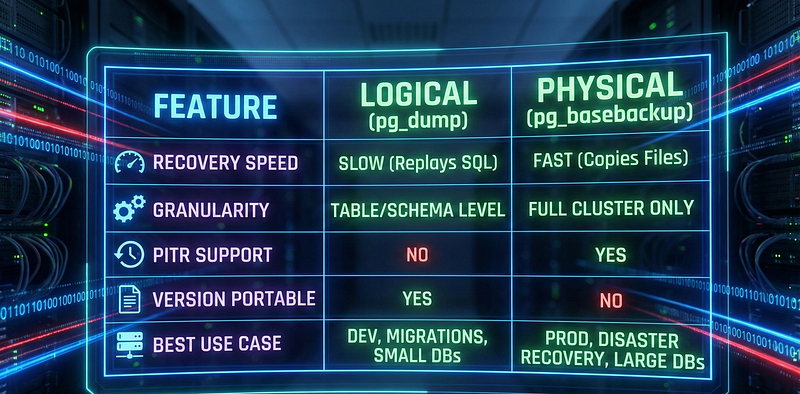
The Verdict: In a robust Enterprise environment, you generally do not choose one over the other. You use Physical Backups for your daily disaster recovery and PITR strategy, and you run Logical Backups occasionally (e.g., weekly) for long-term retention or specific data extraction needs.
2. Understanding the Heartbeat: WAL (Write-Ahead Logs)
If physical backups are the “body” of your database, the Write-Ahead Log (WAL) is its heartbeat. You cannot design a proper Disaster Recovery strategy without understanding how WAL works.
In PostgreSQL, no change happens to the data files until it has been written to the WAL. This is the core principle of Durability (the ‘D’ in ACID).
2.1. The Flow of Data: Why WAL Exists?
You might ask: “Why doesn’t Postgres just write the INSERT data directly to the table file on the disk?"
The answer is Performance and Safety.
- Writing to table files requires Random I/O (jumping around the disk), which is slow.
- Writing to the WAL involves Sequential I/O (appending to the end of a file), which is extremely fast.
The Life Cycle of a Transaction:
- Memory (Shared Buffers): The user sends an
UPDATE. The change is made in RAM first. These are called "dirty pages." - WAL Buffer: The change is effectively “logged” in the WAL buffer.
- Flush to Disk (WAL): The log is flushed to the physical WAL file (
pg_waldirectory) on disk. At this precise moment, the transaction is considered "committed". - Checkpoint (The Sync): Later, a background process (Checkpointer) takes those “dirty pages” from RAM and writes them to the actual data files (
base/directory).
2.2. The Role of Checkpoints
WAL files cannot grow forever. PostgreSQL recycles them.
A Checkpoint is a system event that guarantees all changes in the WAL up to a certain point have been safely written to the main data files.
- Too Frequent Checkpoints: Performance hit (too much writing to disk).
- Too Rare Checkpoints: Fast performance, but if the server crashes, recovery takes a long time because Postgres has to replay gigabytes of WAL files.
2.3. WAL Archiving: The Key to Time Travel
This is where “Backup Strategy” begins.
By default, PostgreSQL deletes (recycles) old WAL files once a checkpoint is complete. This is fine for crash recovery, but useless for backups. To go back in time (PITR), we need a continuous chain of every single transaction that ever happened.
To achieve this, we turn on WAL Archiving. We tell Postgres: “Don’t delete this WAL file. Instead, copy it to this safe folder (or S3 bucket).”
The Magic Command: archive_command
# postgresql.conf
archive_mode: true
archive_command: pgbackrest --stanza=prod_backup archive-push %p
(Note: In modern setups using tools like pgBackRest, this command is handled automatically, but understanding the concept is vital.)
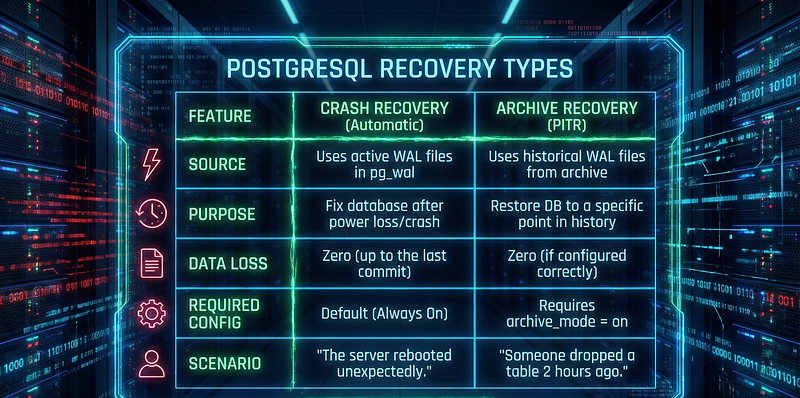
Comparison: Crash Recovery vs. Archive Recovery
Here is the distinction that separates a Junior DBA from a Senior DBA:
Summary
You now understand that the Base Backup (Section 1) is just a snapshot, a starting point. The Archived WALs (Section 2) are the video recording of everything that happened afterwards.
To restore a database, we restore the snapshot, and then “replay” the video (WALs) until we reach the desired moment.
Here is Section 3, maintaining the same high standard with a focus on strategy and the necessary trade-offs.
3. The Strategy Matrix: Full, Differential, and Incremental
Now that we have the Base Backup (the body) and the WALs (the heartbeat), we face a logistical problem: Size and Time.
If you have a 10 TB database, taking a Full backup every night is likely impossible. It might take 10 hours to complete, saturating your I/O and network, only to finish just as the business day begins.
This is where smart engineering comes in. We don’t need to copy the entire database every time. We only need to copy what changed.
3.1. The “Full” Backup (The Foundation)
Every backup chain must start here. A Full Backup copies every single file in the database cluster.
- Pros: Simplest to manage. Fastest to restore (you only need this one backup).
- Cons: Slowest to take. Consumes the most storage.
- Verdict: Mandatory at least once (e.g., Weekly).
3.2. Differential Backup (The Cumulative)
A Differential backup looks at the last Full Backup and says: “I will save everything that has changed since then.”
- Day 1 (Full): 100 GB.
- Day 2 (Diff): 5 GB changed since Day 1.
- Day 3 (Diff): 10 GB changed since Day 1.
- How to Restore: You need the Day 1 Full + Day 3 Diff.
- Pros: Restore is relatively fast (only 2 steps).
- Cons: The file grows larger every day until the next Full backup.
3.3. Incremental Backup (The Efficient)
This is the game-changer for large databases. An Incremental backup looks at the most recent backup of any kind (Full, Diff, or previous Incremental) and saves only what changed since that specific point.
- Day 1 (Full): 100 GB.
- Day 2 (Incr): 2 GB changed since Day 1.
- Day 3 (Incr): 3 GB changed since Day 2.
- How to Restore: You need Day 1 Full + Day 2 Incr + Day 3 Incr.
- Pros: Fastest backup time. Lowest storage footprint.
- Cons: Slowest restore time (the engine must reconstruct the chain step-by-step).
The Tool: Why you need pgBackRest
Here is a hard truth: Vanilla PostgreSQL (before v17) does not natively support efficient Incremental backups.
While you can script rsync or use low-level API calls, it is brittle and prone to corruption. In the professional world, we delegate this complexity to pgBackRest.
Why pgBackRest is the Industry Standard:
- Block-Level Intelligence: It doesn’t just copy files; it checks checksums to see which specific blocks inside the file changed.
- Compression: It uses parallel ZSTD compression (the fastest algorithm available).
- S3 Integration: It pushes backups directly to AWS S3, Azure Blob, or MinIO efficiently.
- Auto-Retention: You set the policy (“Keep 2 Full, 7 Diff”), and it deletes the old ones automatically.
The Great Trade-off Matrix
This table defines your strategy. Show this to your manager when discussing budget for storage vs. requirement for speed.

A Sample “Enterprise” Schedule
A balanced strategy for a critical production database usually looks like this:
- Sunday (02:00 AM): FULL Backup.
- Wednesday (02:00 AM): DIFFERENTIAL Backup (to shorten the restore chain).
- Daily (Other days): INCREMENTAL Backup.
- Continuous: WAL Archiving (for PITR).
This setup ensures you never lose data, storage costs are optimized, and restore times remain reasonable.
4. Time Travel: Point-in-Time Recovery (PITR)
This is the feature that saves careers.
Imagine this scenario: It is Thursday, 14:30. A junior developer runs a migration script meant for the staging environment. Unfortunately, they are connected to Production.
DROP TABLE orders CASCADE;The command executes instantly. Millions of records are gone. The application starts throwing 500 errors. The phone starts ringing.
If you only have last night’s backup (taken at 02:00 AM), you have just lost 12.5 hours of business data. In a high-transaction environment, this is unacceptable.
But you have a PITR strategy. You don’t need to accept the loss. You are going to rewind time to 14:29:59.
4.1. How the Magic Works
PITR is not a simple “Restore” button. It is a reconstruction process.
Remember the formula: Base Backup + Archived WALs = State at Any Second.
When you initiate a PITR, PostgreSQL follows this sequence:
- Extract: It restores the file system from the last valid physical backup (e.g., the Full backup from Sunday, or the Incremental from this morning).
- Replay: It starts reading the WAL files from the archive, re-executing every transaction that happened since that backup.
- Stop: It continues replaying until it hits your specified “Stop Point” (Target Time, Transaction ID, or LSN).
- Open: It stops recovery and opens the database for connections.
4.2. Configuration: The restore_command
To tell PostgreSQL how to fetch these files, we use the restore_command in postgresql.conf (or postgresql.auto.conf).
# Only Example For Restore Command
restore_command: pgbackrest --stanza=prod_backup archive-get %f "%p"
4.3. Defining the Stop Point
You need to tell Postgres exactly when to stop. This is defined in the restoration configuration:
- Time-Based:
recovery_target_time = '2026-01-02 14:29:59'(Most common method. "Go back to just before the disaster.") - Transaction-Based:
recovery_target_xid = '1004502'(Precise method. Requires finding the specific Transaction ID of theDROPcommand in the logs.) - LSN-Based:
recovery_target_lsn = '0/50000148'(Log Sequence Number. For internal consistency or replication sync.)
4.4. The Concept of Timelines (The Multiverse)
This is where it gets sci-fi. When you perform a PITR, you are altering history.
If you go back to Thursday 14:30 and start writing new data, you cannot simply overwrite the old history (because maybe you want to change your mind later).
PostgreSQL handles this by creating a new Timeline ID.
- Timeline 1: The original history (including the
DROP TABLE). - Timeline 2: The new history starting from 14:29:59 (where the table still exists).
PostgreSQL effectively creates a parallel universe for your data. This allows you to switch back and forth between timelines if you made a mistake during recovery.
4.5. The “recovery.signal” File
How does Postgres know it is in “Recovery Mode” and not normal startup?
You place an empty file named recovery.signal in the data directory ($PGDATA). When Postgres starts:
- It sees
recovery.signal. - It reads the
restore_command. - It pulls the base backup and starts replaying WALs.
- When it finishes, it deletes
recovery.signaland opens for business.
Summary
PITR turns a catastrophic data loss event into a temporary downtime event. It allows you to recover data with sub-second precision. However, it relies entirely on the integrity of your WAL Archive. If your WAL chain is broken (missing file), the replay stops, and you cannot go further.
5. Tools of the Trade: Don’t Reinvent the Wheel
A common mistake among new PostgreSQL administrators is “Script Hubris.” They think, “I know bash. I can write a script that tars the data directory and scp’s it to another server.”
Don’t do this.
Manual scripts fail silently. They struggle with WAL management, they don’t handle retention policies (deleting old backups safely), and they rarely implement encryption or compression correctly. Most importantly, testing a restore from a pile of manual tar files is a nightmare.
In the PostgreSQL ecosystem, there are robust, open-source tools designed specifically for this.
5.1. pgBackRest (The Modern Gold Standard)
If you are starting a new project today, use pgBackRest. It has become the de-facto standard for enterprise PostgreSQL backups.
- Why it wins:
- Performance: It is multi-threaded and highly optimized. It can saturate a 10Gb network link easily.
- Delta Restore: This is a killer feature. If your 1TB database is corrupted, but only 50MB of data is actually wrong, pgBackRest calculates the difference and restores only the needed blocks. This reduces restore time from hours to minutes.
- Cloud Native: First-class support for S3, Azure, and GCS object storage.
- Encryption: Encrypts backups before they leave the server.
5.2. Barman (Backup and Recovery Manager)
Developed by 2ndQuadrant (now EDB), Barman is the traditional rival to pgBackRest and is still widely used.
- Why consider it:
- Centralized Management: Barman is designed to run on a central backup server and “pull” backups from multiple DB nodes. This is great for security (the DB server doesn’t need write access to the backup server).
- Streaming Backups: It can stream WALs directly from the replication protocol, reducing the RPO (Recovery Point Objective) to near zero without needing an
archive_command.
5.3. pg_basebackup (The Built-in Utility)
This comes installed with PostgreSQL.
- When to use it:
- Creating a quick replica/slave server.
- Simple, one-off backups for testing.
- Why it’s not enough for Enterprise:
- No catalog (It doesn’t remember history).
- No incremental backups (Always copies everything).
- No automated retention (You have to manually delete old files).
Comparison at a Glance
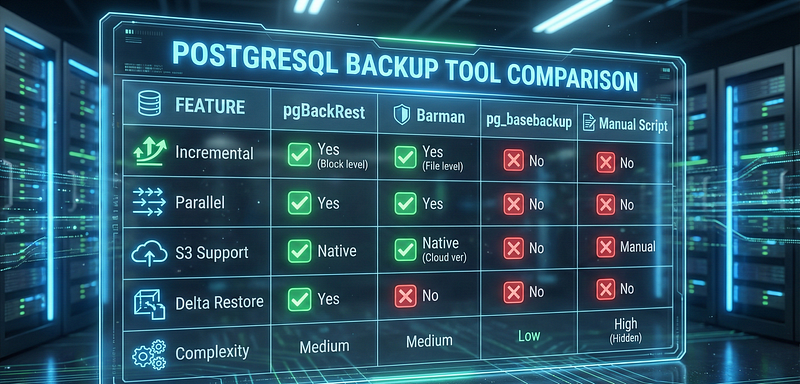
Summary
For 90% of use cases, pgBackRest is the correct choice. It strikes the perfect balance between performance, features, and cloud readiness. pg_basebackup is a tool for replication, not for a comprehensive backup strategy.
6. Best Practices & RPO/RTO
Having the tools and the theory is meaningless if you don’t have a policy. In the enterprise world, your backup strategy is defined by two metrics:
- RPO (Recovery Point Objective): “How much data can we afford to lose?”
- If RPO is 1 hour: You can take hourly incremental backups.
- If RPO is 0 (Zero Data Loss): You must use WAL Archiving (PITR) or Synchronous Replication.
- RTO (Recovery Time Objective): “How fast must the database be up and running again?”
- If RTO is 4 hours: Restoring from S3 is fine.
- If RTO is 5 minutes: You need a Standby Replica for failover, not just a backup.
The Golden Rules of PostgreSQL Backups
Schrödinger’s Backup: A backup is both valid and invalid until you try to restore it.
- Rule: Test your backups automatically. A script should restore your production backup to a staging server every week. If the restore fails, alert the team immediately.
The 3–2–1 Rule:
- 3 copies of your data (Production, Backup 1, Backup 2).
- 2 different media types (Local Disk, Object Storage/Tape).
- 1 copy off-site (Different Data Center or Region).
Security First:
- Encryption: Backups contain your most sensitive data. Always encrypt them at rest (e.g., pgBackRest encryption features).
- Access Control: The backup server should pull data from the DB server. The DB server should not have write access to the backup server (to prevent Ransomware from wiping backups after encrypting the DB).
Monitor Your WALs: If your archive_command fails (e.g., S3 is down), WAL files will pile up in pg_wal until your disk fills up and the database crashes. Monitor the size of your pg_wal directory!
Conclusion
PostgreSQL backup is not a “set it and forget it” task. It is a discipline.
We started with simple Logical Backups (pg_dump) for migrations. We moved to the speed of Physical Backups for large datasets. We unlocked the power of time travel with PITR and WAL Archiving, and we optimized our storage with Incremental strategies using tools like pgBackRest.
The best time to design your backup strategy was yesterday. The second best time is today. Go check your archive_command now.
References
- PostgreSQL Global Development Group. Backup and Restore. Retrieved from postgresql.org/docs/current/backup.html
- PostgreSQL Global Development Group.PostgreSQL Documentation: Continuous Archiving and Point-in-Time Recovery (PITR). Retrieved from postgresql.org/docs/current/continuous-archiving.html
- PgBackRest User Guide: Reliable PostgreSQL Backup & Restore. Retrieved from pgbackrest.org/user-guide.html
- Barman Documentation: Backup and Recovery Manager for PostgreSQL. Retrieved from pgbarman.org