 ← PostgreSQL Blog
PostgreSQL Tablespaces
PostgreSQL Tablespaces
In PostgreSQL, a Tablespace is a storage location where the actual data files of database objects (like tables and indexes) reside. It allows administrators to move data across different physical storage devices seamlessly.
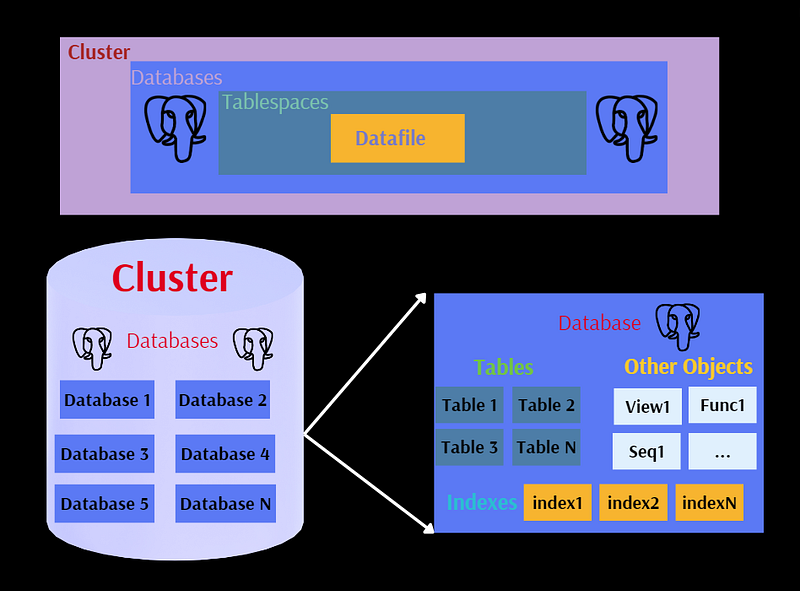
Table of Contents
- Introduction to Tablespaces
- Strategic Benefits
- Critical Security & Reliability Warnings
- Creating and Managing Tablespaces
- Moving Objects Between Tablespaces
- Temporary Tablespaces for Performance
- Monitoring & System Information
- References
Introduction to Tablespaces
By default, PostgreSQL stores all data in the directory initialized by initdb (known as $PGDATA). Tablespaces provide a mechanism to break this boundary, allowing you to define alternative file system locations for your data.
Strategic Benefits
- Storage Expansion: If the primary partition is full, you can mount a new disk and extend your database capacity without reinitializing the cluster.
- Performance Tiers:
- Hot Data: Place frequently accessed indexes on high-speed NVMe/SSDs.
- Cold Data: Store historical or archive tables on high-capacity, lower-cost HDDs.
Critical Security & Reliability Warnings
Tablespaces are not autonomous. They are logically tied to the main database cluster. If a tablespace disk fails or a directory is deleted, the entire database cluster may become unstartable or suffer severe data corruption. Never place tablespaces on transient storage like RAM disks unless data loss is acceptable.
Creating and Managing Tablespaces
Step 1: OS Level Preparation
The directory must be empty and owned by the postgres user.
mkdir /mnt/fast_ssd/pg_space

chown postgres:postgres /mnt/fast_ssd/pg_space
Step 2: SQL Definition
CREATE TABLESPACE fast_res LOCATION '/mnt/fast_ssd/pg_space';Step 3: Assigning Objects
-- Creating a database in a specific tablespace
CREATE DATABASE analytics_db TABLESPACE fast_res;

-- Creating a table in a specific tablespace
CREATE TABLE logs (id int, entry text) TABLESPACE fast_res;
Moving Objects Between Tablespaces
PostgreSQL makes it easy to migrate data between storage tiers online:
-- Move a single table
ALTER TABLE logs SET TABLESPACE pg_default;

-- Move all tables from one tablespace to another
ALTER TABLE ALL IN TABLESPACE fast_res SET TABLESPACE pg_default;
Temporary Tablespaces for Performance
To prevent large sort operations or joins from filling up your main disk, use a dedicated temporary tablespace:
ALTER SYSTEM SET temp_tablespaces = 'temp_ssd_space';

SELECT pg_reload_conf();
Monitoring & System Information
Use the following query to audit your storage distribution and sizes:
SELECT
        spcname                                                       AS "Name"    ,
        pg_catalog.pg_get_userbyid(spcowner)                          AS "Owner"   ,
        pg_catalog.pg_tablespace_location(oid)                        AS "Location",
        pg_catalog.pg_size_pretty(pg_catalog.pg_tablespace_size(oid)) AS "Size"
FROM
        pg_catalog.pg_tablespace;