 ← PostgreSQL Blog
Rapid REST API With PostgREST
Rapid REST API With PostgREST
PostgREST transforms your PostgreSQL database into a compliant RESTful API, eliminating the need for manual backend coding. This guide covers the complete workflow from binary installation to API testing with Postman.
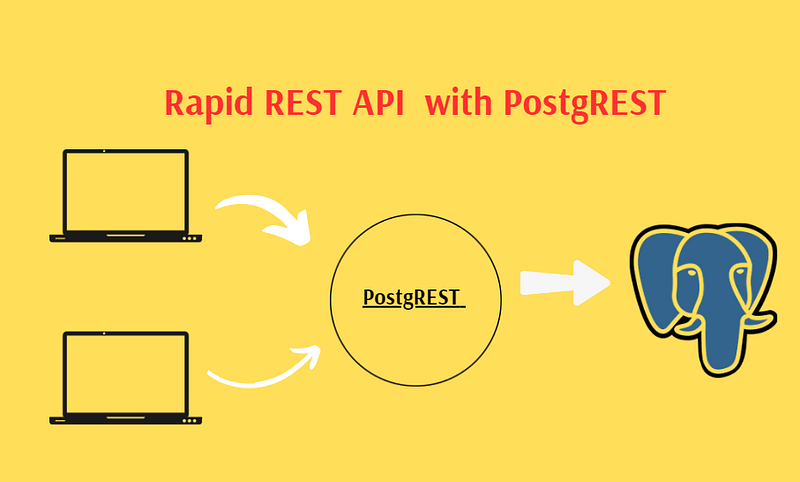
Table of Contents
- Step 1: Downloading and Installing the Binary
- Step 2: Creating the Configuration File
- Step 3: Running PostgREST as a System Service
- Step 4: Starting and Enabling the Service
- Step 5: Installing Postman for API Testing
- Step 6: API Testing with CRUD Operations
- Step 7: Best Practices & Security Considerations
- Conclusion
1. Downloading and Installing PostgREST
First, download the pre-compiled static binary for Linux.
curl -LO https://github.com/PostgREST/postgrest/releases/download/v14.3/postgrest-v14.3-linux-static-x86-64.tar.xz
tar -xf postgrest-v14.3.0-linux-static-x64.tar.xz
sudo mv postgrest /usr/local/bin/
sudo chmod +x /usr/local/bin/postgrest
2. Creating the Configuration File
PostgREST requires a configuration file to connect to your database. Create a dedicated directory and file:
sudo mkdir -p /etc/postgrest
sudo nano /etc/postgrest/config
Paste and modify the following settings:
db-uri = "postgresql://postgres:password@10.5.**.**:1907/testdb"
db-schema = "yol"
db-anon-role = "user1"
jwt-secret = "your_ultra_secure_32_char_secret_key"
jwt-secret-is-base64 = false
server-port = 3000
3. Running PostgREST as a System Service
To ensure high availability and auto-restart capabilities, wrap the process in a systemd service.
sudo nano /etc/systemd/system/postgrest.serviceAdd the following configuration:
[Unit]
Description=PostgREST API Service
After=network.target postgresql.service

[Service]
ExecStart=/usr/local/bin/postgrest /etc/postgrest/config
Restart=always
User=postgres
Group=postgres

[Install]
WantedBy=multi-user.target
4. Starting and Enabling the Service
Apply the changes and start your API:
sudo systemctl daemon-reload
sudo systemctl enable postgrest
sudo systemctl start postgrest
Verify the status:
sudo systemctl status postgrest5. Installing Postman for API Testing
Postman is the industry standard for testing REST endpoints. On RHEL or similar systems, use snap:
# Install snapd
sudo dnf install snapd
sudo systemctl enable --now snapd.socket
sudo ln -s /var/lib/snapd/snap /snap

# Install and Run Postman
sudo snap install postman
snap run postman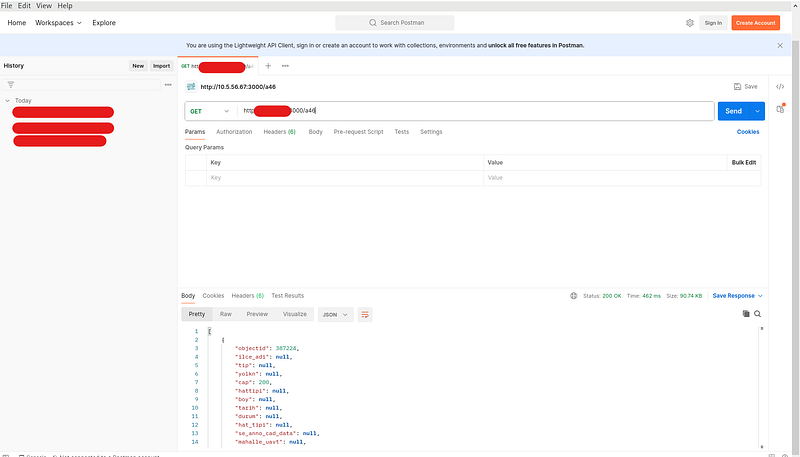
6. API Testing with CRUD Operations
You can now interact with your database tables as API endpoints.
- GET (Read):
http://your_ip:3000/yol - POST (Create):
curl -X POST http://10.**.**.**:3000/yol \
     -H "Content-Type: application/json" \
     -d '{"numara":"1234","ad":"ali","soyad":"den"}'
If everything is set up correctly, you should see a response indicating that PostgREST is running and accessible.

7. Best Practices & Security Considerations
To ensure your API is both high-performing and secure, follow these core principles:
- Principle of Least Privilege: Never use the
postgressuperuser as yourdb-anon-role. Create a specific web-user role in PostgreSQL that only hasSELECTpermissions on the tables you want to make public. - Enable Row-Level Security (RLS): This is PostgREST’s superpower. By enabling RLS in PostgreSQL, you can define policies so that users can only see or edit their own data. Example:
CREATE POLICY user_mod_own ON yol FOR UPDATE USING (owner = current_user); - Use a Reverse Proxy (Nginx/Apache): PostgREST does not handle HTTPS natively. In a production environment, always put a reverse proxy like Nginx in front of it to manage SSL/TLS certificates and provide an extra layer of logging.
- JWT for Authentication: For sensitive operations (Insert, Update, Delete), use JSON Web Tokens. This allows PostgREST to switch from the anonymous role to a “signed-in” role automatically based on the token provided in the request header.
- Set Connection Limits: To prevent a single API from overwhelming your database, configure the
db-poolsize in your config file to match your hardware capabilities. - Schema Isolation: Keep your “API” tables in a separate schema (like your
yolschema) rather than the defaultpublicschema. This prevents accidental exposure of internal system tables.
Conclusion
By following these steps, you have successfully bridged your PostgreSQL database to a live REST API. This setup provides a scalable foundation for mobile and web applications without the overhead of writing custom server-side logic.