 ← PostgreSQL Blog
PostgreSQL Locks
PostgreSQL Locks
PostgreSQL is a powerful, concurrent, multi-user database system. One of its most crucial mechanisms for maintaining data integrity and consistency is locking. But how does PostgreSQL allow multiple users to work on the same table at the same time? Why don’t concurrent operations result in chaos? The answer lies in its transaction-based architecture and sophisticated locking mechanisms.
In this article, we’ll explore:
- How locks work in PostgreSQL
- Types of locks and their usage
- Lock conflicts and deadlocks
- Monitoring locks in real time
- Best practices for troubleshooting
How Locking Works in PostgreSQL
Every transaction in PostgreSQL is assigned a Transaction ID (XID). When two or more operations target the same table or row simultaneously, PostgreSQL uses locks to serialize those operations.
Autocommit and Transactions
By default, PostgreSQL uses autocommit, meaning each SQL statement is treated as a separate transaction.
When AUTOCOMMIT is turned off:
\set AUTOCOMMIT offYou can manage transactions manually using:
BEGIN;
-- your SQL commands
COMMIT;
Lock Types in PostgreSQL
PostgreSQL uses lightweight locks (LWLocks) internally and heavyweight locks (also known as relation-level locks) for SQL operations. Let’s focus on heavyweight table-level locks.
Lock Table Syntax
You can explicitly lock a table using:
BEGIN;
LOCK TABLE table_name IN ACCESS EXCLUSIVE MODE;
COMMIT;
Lock Modes Explained
|   Lock Type                |   Explanation                                                                                              |   Example SQL                                    |
| -------------------------- | ---------------------------------------------------------------------------------------------------------- | -------------------------------------------------|
|   ACCESS SHARE             | Only read operations are allowed. Automatically used by simple  SELECT  queries.                           | LOCK TABLE deneme IN ACCESS SHARE MODE;          |
|   ROW SHARE                | Acquired by  SELECT ... FOR UPDATE  or  SELECT ... FOR SHARE .                                             | LOCK TABLE deneme IN ROW SHARE MODE;             |
|   ROW EXCLUSIVE            | Acquired by DML operations like  INSERT ,  UPDATE , or  DELETE .                                           | LOCK TABLE deneme IN ROW EXCLUSIVE MODE;         |
|   SHARE UPDATE EXCLUSIVE   | Used during maintenance operations like  VACUUM ,  ANALYZE . Allows reads, but conflicts with some writes. | LOCK TABLE deneme IN SHARE UPDATE EXCLUSIVE MODE |
|   SHARE                    | Allows other  SHARE  locks but blocks writes. Often used by  CREATE INDEX CONCURRENTLY .                   | LOCK TABLE deneme IN SHARE MODE;                 |
|   SHARE ROW EXCLUSIVE      | A strong lock that conflicts with almost all other locks.                                                  | LOCK TABLE deneme IN SHARE ROW EXCLUSIVE MODE;   |
|   EXCLUSIVE                | Blocks all operations except simple  SELECT  queries.                                                      | LOCK TABLE deneme IN EXCLUSIVE MODE;             |
|   ACCESS EXCLUSIVE         | The strictest lock. Blocks all other operations, including reads and writes.                               | LOCK TABLE deneme IN ACCESS EXCLUSIVE MODE;      |
Lock Compatibility Matrix
|   Lock Type                |   DML (INSERT/UPDATE/DELETE)   |   DDL (ALTER/DROP)   |   SELECT   |   Description                                             |
| -------------------------- | ------------------------------ | -------------------- | ---------- | --------------------------------------------------------- |
|   ACCESS SHARE             | No                             | No                   | Yes        | Read-only access. Used by simple SELECT queries.          |
|   ROW SHARE                | No                             | No                   | Yes        | Used by   SELECT ... FOR UPDATE   and similar statements. |
|   ROW EXCLUSIVE            | Only within same transaction   | No                   | Yes        | Acquired by INSERT, UPDATE, DELETE.                       |
|   SHARE UPDATE EXCLUSIVE   | Limited conflicts              | No                   | Yes        | Used by VACUUM, ANALYZE, some DDL operations.             |
|   SHARE                    | No                             | Limited              | Yes        | Used by   CREATE INDEX CONCURRENTLY  .                    |
|   SHARE ROW EXCLUSIVE      | No                             | No                   | Yes        | Conflicts with nearly all other locks.                    |
|   EXCLUSIVE                | Only within same transaction   | No                   | Yes        | Blocks most DDL and DML operations.                       |
|   ACCESS EXCLUSIVE         | No                             | Only within itself   | No         | The strictest lock – blocks all other access.             |
Maintenance Commands That Cause Locks
Certain DDL or maintenance operations automatically acquire strict locks:
VACUUM FULL→ACCESS EXCLUSIVEALTER TABLE→ACCESS EXCLUSIVECREATE INDEX→ may block writes ( Use concurently sysntax for unblocking)pg_repack→ uses minimal locking (online alternative toVACUUM FULL)
How to Check for Locks
You can inspect current locks with this query:
SELECT
        locktype,
        mode    ,
        granted ,
        pid     ,
        pg_blocking_pids(pid) AS wait_for
FROM
        pg_locks
WHERE
        relation = 'deneme'::regclass;
To check what queries are blocking others:
SELECT
        bl.pid    AS blocked_pid  ,
        ba.query  AS blocked_query,
        bl2.pid   AS blocking_pid ,
        ba2.query AS blocking_query
FROM
        pg_locks bl JOIN pg_stat_activity ba ON bl.pid = ba.pid JOIN pg_locks bl2 ON bl2.locktype = bl.locktype
        AND bl2.database IS NOT DISTINCT
FROM
        bl.database
        AND bl2.relation IS NOT DISTINCT
FROM
        bl.relation
        AND bl2.pid != bl.pid JOIN pg_stat_activity ba2 ON bl2.pid = ba2.pid
WHERE
        NOT bl.granted
AND     bl2.granted;
Deadlocks
What is a Deadlock?
When two sessions hold locks that the other needs, they block each other. PostgreSQL detects this and aborts one of them.
Parameters for Deadlock Handling
deadlock_timeout– time to wait before checking for deadlockslock_timeout– max wait time before an operation failslog_lock_waits– logs operations that wait longer thandeadlock_timeout
-- Example: Set timeout to 5 seconds
SET lock_timeout = '5s';
Monitoring Locks with Prometheus + Grafana
If you use postgres_exporter, here are some useful PromQL queries:
Lock Count by Type
pg_locks_count{datname=~"$datname", instance=~"$instance", mode=~"$mode"} != 0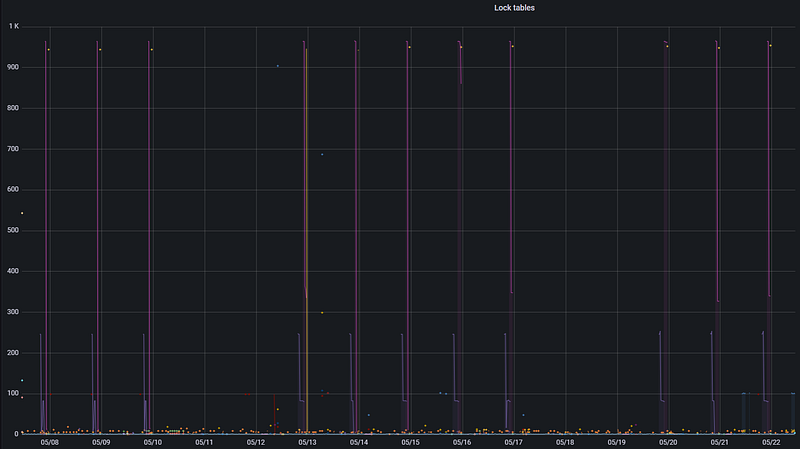
Conflict Rate (5 minutes)
irate(pg_stat_database_conflicts{datname=~"$datname", instance=~"$instance"}[5m])Deadlock Rate (5 minutes)
irate(pg_stat_database_deadlocks{datname=~"$datname", instance=~"$instance"}[5m])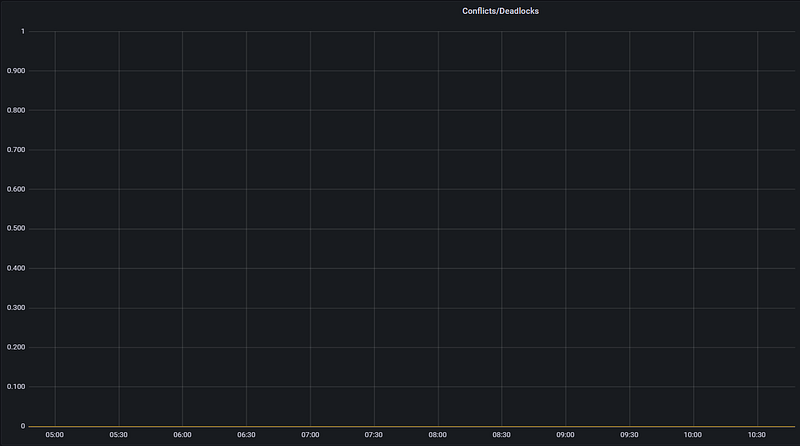
Add these to Grafana panels for lock observability. Also, you can add more metric your needs.
Best Practices
- Use
pg_repackinstead ofVACUUM FULLto avoid long locks. - Avoid long transactions; they increase the risk of blocking others.
- Always monitor long-running queries.
- Use
lock_timeoutin high-concurrency applications. - Analyze locking behavior using
pg_locksandpg_stat_activity.
Test Case: Simulating a Lock
Session 1:
BEGIN;
LOCK TABLE deneme IN ACCESS EXCLUSIVE MODE;
-- don't commit yet
Session 2:
SELECT * FROM deneme;
-- this will wait until Session 1 commits or rolls back
Check your locked query:
SELECT
        bl.pid      AS blocked_pid  ,
        ba.usename  AS blocked_user ,
        bl2.pid     AS blocking_pid ,
        ba2.usename AS blocking_user,
        ba.query    AS blocked_query,
        ba2.query   AS blocking_query
FROM
        pg_catalog.pg_locks bl JOIN pg_catalog.pg_stat_activity ba ON ba.pid = bl.pid JOIN pg_catalog.pg_locks bl2 ON ( bl.locktype = bl2.locktype
        AND bl.database                                                                                                             = bl2.database
        AND bl.relation IS NOT DISTINCT FROM bl2.relation
        AND bl.page IS NOT DISTINCT FROM bl2.page
        AND bl.tuple IS NOT DISTINCT FROM bl2.tuple
        AND bl.virtualxid IS NOT DISTINCT FROM bl2.virtualxid
        AND bl.transactionid IS NOT DISTINCT FROM bl2.transactionid
        AND bl.classid IS NOT DISTINCT FROM bl2.classid
        AND bl.objid IS NOT DISTINCT FROM bl2.objid
        AND bl.objsubid IS NOT DISTINCT FROM bl2.objsubid
        AND bl.pid <> bl2.pid ) JOIN pg_catalog.pg_stat_activity ba2 ON ba2.pid = bl2.pid
WHERE
        NOT bl.granted
AND     bl2.granted;

output like
----------
931819 "test1" 929286 "test1" "select * from deneme;" "LOCK TABLE deneme IN ACCESS EXCLUSIVE MODE;"
Summary
PostgreSQL’s lock system ensures data consistency and concurrency by intelligently controlling access to resources. While automatic locking usually suffices, understanding and monitoring lock behavior is crucial for performance tuning and avoiding deadlocks. Use PostgreSQL’s internal views and monitoring tools like Prometheus + Grafana to stay ahead of locking issues in production environments.